Codrops 원본
Building an Interactive Crumpled Paper Effect with Houdini VAT and Three.js
섹션 · MIT
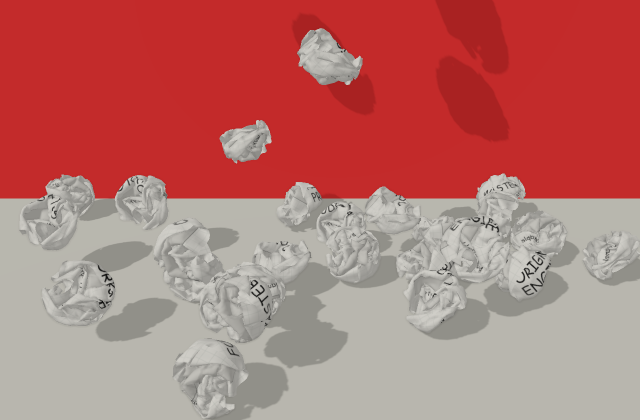
갤러리 안에서는 화면을 벗어나거나 움직임을 멈추면 예제도 닫힙니다. 다시 재생할 때는 처음부터 시작해요.
SOURCE FILES
원본 코드 읽기
수집한 원본 소스와 실행 안내를 함께 제공합니다.
index.html
<!DOCTYPE html>
<html lang="ja">
<head>
  <meta charset="UTF-8" />
  <meta name="viewport" content="width=device-width, initial-scale=1.0" />
  <title>Paper Crumple (VAT)</title>
  <link rel="preconnect" href="https://fonts.googleapis.com" />
  <link rel="preconnect" href="https://fonts.gstatic.com" crossorigin />
  <link
    href="https://fonts.googleapis.com/css2?family=Caveat:wght@400..700&family=Yomogi&display=swap"
    rel="stylesheet"
  />
  <style>
    html, body {
      margin: 0;
      padding: 0;
      width: 100%;
      height: 100%;
      overflow: hidden;
      background: #f5f5f5;
    }
    #app {
      width: 100vw;
      height: 100vh;
    }
  </style>
  <script type="importmap">
    {
      "imports": {
        "three": "https://cdn.jsdelivr.net/npm/three@0.160.1/build/three.module.js",
        "three/examples/jsm/": "https://cdn.jsdelivr.net/npm/three@0.160.1/examples/jsm/",
        "cannon-es": "https://cdn.jsdelivr.net/npm/cannon-es@0.20.0/dist/cannon-es.js"
      }
    }
  </script>
</head>
<body>
  <div id="app"></div>
  <div id="info">loading...</div>
  <script type="module" src="./src/main-vat.js"></script>
</body>
</html>
src/main-vat.js
import * as THREE from "three";
import * as CANNON from "cannon-es";
import { GUI } from "three/examples/jsm/libs/lil-gui.module.min.js";
import { EffectComposer } from "three/examples/jsm/postprocessing/EffectComposer.js";
import { RenderPass } from "three/examples/jsm/postprocessing/RenderPass.js";
import { SSAOPass } from "three/examples/jsm/postprocessing/SSAOPass.js";
import { OutputPass } from "three/examples/jsm/postprocessing/OutputPass.js";
import { createPaper, updatePaperFrame, PAPER_DESIGNS } from "./paper.js";
import { loadVATData } from "./paper-vat.js";

// ==================================================
// シーン基本セットアップ
// ==================================================
const app = document.getElementById("app");
const info = document.getElementById("info");

const scene = new THREE.Scene();

// 配色 — GUI から変更できる
const colorSettings = {
  background: "#ff3838", // 背面の壁と背景
  floor: "#dcdad0",
};
scene.background = new THREE.Color(colorSettings.background);

// カメラ — 斜め前方から見る (GUI で調整できる)
const cameraSettings = { x: 0, y: 2.2, z: 3.6, targetY: 0.35 };
const camera = new THREE.PerspectiveCamera(
  40,
  window.innerWidth / window.innerHeight,
  0.01,
  100,
);
camera.position.set(cameraSettings.x, cameraSettings.y, cameraSettings.z);
camera.lookAt(0, cameraSettings.targetY, 0);

function applyCameraSettings() {
  camera.position.set(cameraSettings.x, cameraSettings.y, cameraSettings.z);
  camera.lookAt(0, cameraSettings.targetY, 0);
  updateOpenPose();
}

const renderer = new THREE.WebGLRenderer({ antialias: true });
renderer.setPixelRatio(window.devicePixelRatio);
renderer.setSize(window.innerWidth, window.innerHeight);
renderer.outputColorSpace = THREE.SRGBColorSpace;
renderer.shadowMap.enabled = true;
renderer.shadowMap.type = THREE.PCFSoftShadowMap;
app.appendChild(renderer.domElement);

// 床と背面の壁
const FLOOR_VISUAL_Y = -0.1;
const WALL_Z = -1.1;

const floorMat = new THREE.MeshStandardMaterial({ color: colorSettings.floor });
const floor = new THREE.Mesh(new THREE.PlaneGeometry(16, 12), floorMat);
floor.rotation.x = -Math.PI / 2;
floor.position.set(0, FLOOR_VISUAL_Y, 1);
floor.receiveShadow = true;
scene.add(floor);

const wallMat = new THREE.MeshStandardMaterial({
  color: colorSettings.background,
});
const wall = new THREE.Mesh(new THREE.PlaneGeometry(16, 6), wallMat);
wall.position.set(0, FLOOR_VISUAL_Y + 3, WALL_Z);
wall.receiveShadow = true;
scene.add(wall);

// ライト
const ambient = new THREE.AmbientLight(0xffffff, 1.25);
scene.add(ambient);

const dirLight = new THREE.DirectionalLight(0xffffff, 1.15);
dirLight.position.set(-2, 2.6, 1.4);
dirLight.castShadow = true;
dirLight.shadow.mapSize.set(2048, 2048);
dirLight.shadow.camera.left = -4;
dirLight.shadow.camera.right = 4;
dirLight.shadow.camera.top = 4;
dirLight.shadow.camera.bottom = -3;
dirLight.shadow.camera.near = 0.1;
dirLight.shadow.camera.far = 12;
dirLight.shadow.bias = -0.001;
scene.add(dirLight);

const fillLight = new THREE.DirectionalLight(0xffffff, 0);
fillLight.position.set(-2, 1, -1);
scene.add(fillLight);

// ポストプロセス — SSAO で折り目・凹みを暗くする
const composer = new EffectComposer(renderer);
composer.addPass(new RenderPass(scene, camera));

const ssaoPass = new SSAOPass(
  scene,
  camera,
  window.innerWidth,
  window.innerHeight,
);
ssaoPass.kernelRadius = 0.01;
ssaoPass.minDistance = 0.0001;
ssaoPass.maxDistance = 0.08;
// 注意: SSAOPass に intensity プロパティは無い (設定しても no-op)。
// オン/オフは ssaoPass.enabled、強さの調整は kernelRadius / maxDistance で行う。
composer.addPass(ssaoPass);

composer.addPass(new OutputPass());

// ==================================================
// GUI
// ==================================================
const MAX_PAPERS = 50;
const urlParams = new URLSearchParams(window.location.search);
// openFrame: 開いた状態で表示するフレーム。0 = 完全に開き切り、
// 少し上げるとクシャ感が残る (VAT フレームは 0 に近いほど平ら)
const animSettings = { speed: 1.5, openFrame: 4 };
// 紙の枚数 — GUI スライダーか URL パラメータ (?papers=10) で変更できる
const paperSettings = {
  count: Math.min(
    MAX_PAPERS,
    Math.max(1, parseInt(urlParams.get("papers"), 10) || 40),
  ),
};
// GUI は ?gui=on を付けた時だけ表示する
const showGui = urlParams.get("gui") === "on";

// 記事用デバッグフラグ:
//   ?frame=N        全紙を指定フレームで静止表示 (スクショ用。?papers=1 と併用推奨)
//   ?ssao=数値      SSAO 強度を上書き (例 ?ssao=0 でオフ)
//   ?debug=physics  衝突球をワイヤーフレーム表示
const debugFrameParam = urlParams.get("frame");
const debugFrame = debugFrameParam !== null ? parseFloat(debugFrameParam) : null;
const debugPhysics = urlParams.get("debug") === "physics";
const ssaoOverride = urlParams.get("ssao");
if (ssaoOverride !== null && parseFloat(ssaoOverride) <= 0) {
  ssaoPass.enabled = false;
}
const gui = new GUI();
if (!showGui) gui.hide();

const lightFolder = gui.addFolder("Lighting");
lightFolder.add(ambient, "intensity", 0, 3, 0.01).name("Ambient");
lightFolder.add(dirLight, "intensity", 0, 4, 0.01).name("Key Light");
lightFolder.add(dirLight.position, "x", -5, 5, 0.1).name("Key X");
lightFolder.add(dirLight.position, "y", 0, 5, 0.1).name("Key Y");
lightFolder.add(dirLight.position, "z", -5, 5, 0.1).name("Key Z");
lightFolder.add(fillLight, "intensity", 0, 2, 0.01).name("Fill Light");

const ssaoFolder = gui.addFolder("SSAO");
ssaoFolder.add(ssaoPass, "kernelRadius", 0.001, 0.5, 0.001).name("Radius");
ssaoFolder.add(ssaoPass, "minDistance", 0.0001, 0.01, 0.0001).name("Min Dist");
ssaoFolder.add(ssaoPass, "maxDistance", 0.01, 0.5, 0.001).name("Max Dist");
ssaoFolder.add(ssaoPass, "enabled").name("Enabled");

const shadowFolder = gui.addFolder("Shadow");
shadowFolder.add(dirLight.shadow, "bias", -0.01, 0.01, 0.0001).name("Bias");

const colorFolder = gui.addFolder("Colors");
colorFolder
  .addColor(colorSettings, "background")
  .name("Background")
  .onChange((v) => {
    scene.background.set(v);
    wallMat.color.set(v);
  });
colorFolder
  .addColor(colorSettings, "floor")
  .name("Floor")
  .onChange((v) => {
    floorMat.color.set(v);
  });

gui.add(animSettings, "speed", 0.1, 5, 0.1).name("Speed");
gui
  .add(animSettings, "openFrame", 0, 12, 0.5)
  .name("Open Frame")
  .onChange(() => {
    // 開いている紙があれば即時反映
    if (activePaper && activePaper.state === "open") {
      activePaper.frameIdx = animSettings.openFrame;
      updatePaperFrame(activePaper, animData, activePaper.frameIdx);
    } else if (activePaper && activePaper.target) {
      activePaper.target.frameIdx = animSettings.openFrame;
    }
  });
gui
  .add(paperSettings, "count", 1, MAX_PAPERS, 1)
  .name("Papers")
  .onFinishChange(syncPaperCount);

const cameraFolder = gui.addFolder("Camera");
cameraFolder
  .add(cameraSettings, "x", -4, 4, 0.05)
  .name("X")
  .onChange(applyCameraSettings);
cameraFolder
  .add(cameraSettings, "y", 0.2, 4, 0.05)
  .name("Y")
  .onChange(applyCameraSettings);
cameraFolder
  .add(cameraSettings, "z", 0.8, 7, 0.05)
  .name("Z")
  .onChange(applyCameraSettings);
cameraFolder
  .add(cameraSettings, "targetY", 0, 2, 0.05)
  .name("Target Y")
  .onChange(applyCameraSettings);
cameraFolder
  .add(camera, "fov", 10, 90, 1)
  .name("FOV")
  .onChange(() => {
    camera.updateProjectionMatrix();
    updateOpenPose();
  });

// ==================================================
// GUI: 撮影用フラグ (記事のスクショ向け)
// decode / normals はロード時に一度だけ効くので、URL を組み立ててリロードする。
// Pose Frame だけは ?frame= で起動中ならライブで反映される。
// ==================================================
const captureSettings = {
  decode: urlParams.get("decode") || "correct",
  normals: urlParams.get("normals") || "smooth",
  poseFrame: debugFrame !== null ? debugFrame : -1,
  physics: debugPhysics,
  apply() {
    const p = new URLSearchParams(window.location.search);
    p.set("gui", "on");
    p.set("papers", String(paperSettings.count));

    const setOrDelete = (key, value, defaultValue) => {
      if (value === defaultValue) p.delete(key);
      else p.set(key, value);
    };
    setOrDelete("decode", captureSettings.decode, "correct");
    setOrDelete("normals", captureSettings.normals, "smooth");
    setOrDelete("frame", String(captureSettings.poseFrame), "-1");
    if (ssaoPass.enabled) p.delete("ssao");
    else p.set("ssao", "0");
    if (captureSettings.physics) p.set("debug", "physics");
    else p.delete("debug");

    window.location.search = p.toString();
  },
};

const captureFolder = gui.addFolder("Capture (Apply でリロード)");
captureFolder
  .add(captureSettings, "decode", ["correct", "naive", "reversed", "noflip", "nomirror"])
  .name("Decode");
captureFolder
  .add(captureSettings, "normals", ["smooth", "flat"])
  .name("Normals");
captureFolder
  .add(captureSettings, "poseFrame", -1, 49, 0.5)
  .name("Pose Frame (-1=off)")
  .onChange((value) => {
    // すでに ?frame= で起動していれば、その場でフレームを差し替える
    if (debugFrame === null || value < 0 || !animData) return;
    for (const paper of papers) {
      if (paper.state !== "posed") continue;
      paper.frameIdx = Math.max(0, Math.min(value, animData.frameCount - 1));
      updatePaperFrame(paper, animData, paper.frameIdx);
    }
  });
captureFolder.add(captureSettings, "physics").name("Show Colliders");
captureFolder.add(captureSettings, "apply").name("▶ Apply & Reload");

// ==================================================
// データロード → 紙メッシュ作成(3枚)
// ==================================================
const papers = [];
let animData = null;
let activePaper = null;

const PAPER_OFFSETS = [
  [-1.25, 0.02, -0.1],
  [0, 0.02, 0.12],
  [1.25, 0.02, -0.06],
];

// 開いた紙: カメラ正面 OPEN_DISTANCE 先に、画面高さの90%で正対表示する
// (ステージ上のどの紙玉よりもカメラに近い距離にして、必ず最前面に見えるようにする)
const OPEN_SCREEN_RATIO = 0.9;
const OPEN_DISTANCE = 1.5;
const CLOSED_SCALE = 0.82;

const flatSize = { width: 1, depth: 1.4 };

// 紙玉が動ける床の範囲 (壁と画面から決めた固定ステージ)
const STAGE_BOUNDS = { minX: -2.4, maxX: 2.4, minZ: WALL_Z, maxZ: 1.7 };
const OPEN_DURATION = 1.15;
const DISCARD_DURATION = 1.25;
const ROLL_LINEAR_RESISTANCE = 2.6;
const ROLL_ANGULAR_RESISTANCE = 4.5;
const ROLL_SETTLE_SPEED = 0.018;
const PHYSICS_STEP = 1 / 60;
const PAPER_MASS = 0.16;

// 掴んで投げる操作
const GRAB_LIFT = 0.5;
const GRAB_STIFFNESS = 14;
const GRAB_MAX_SPEED = 4.5;
const THROW_MAX_SPEED = 3.2;
const CLICK_DRAG_THRESHOLD_PX = 6;

// くしゃくしゃ状態の衝突球・回転中心 — VAT ロード後に実測値で上書きする
let collisionRadius = 0.25;
let restCenterY = FLOOR_VISUAL_Y + 0.25; // 静止時の紙玉中心の高さ
let restMeshY = 0.02; // 静止時のメッシュ原点の高さ
const crumpleCenter = new THREE.Vector3(0, 0.2, 0);

// ==================================================
// 簡易物理 — 丸まった紙だけ球体剛体として扱う
// ==================================================
const physicsWorld = new CANNON.World({
  gravity: new CANNON.Vec3(0, -7.0, 0),
});
physicsWorld.allowSleep = false;
physicsWorld.defaultContactMaterial.friction = 0.8;
physicsWorld.defaultContactMaterial.restitution = 0.15;

const paperMaterial = new CANNON.Material("paper");
const floorPhysicsMaterial = new CANNON.Material("floor");
physicsWorld.addContactMaterial(
  new CANNON.ContactMaterial(paperMaterial, floorPhysicsMaterial, {
    friction: 1.0,
    restitution: 0.12,
  }),
);
// 紙同士 — 軽く弾む
physicsWorld.addContactMaterial(
  new CANNON.ContactMaterial(paperMaterial, paperMaterial, {
    friction: 0.6,
    restitution: 0.3,
  }),
);

const floorBody = new CANNON.Body({
  mass: 0,
  material: floorPhysicsMaterial,
  shape: new CANNON.Plane(),
  position: new CANNON.Vec3(0, FLOOR_VISUAL_Y, 0),
  quaternion: new CANNON.Quaternion().setFromEuler(-Math.PI / 2, 0, 0),
});
physicsWorld.addBody(floorBody);

// メッシュ原点は紙玉の底付近にあるため、剛体の中心(=紙玉の中心)との間で
// crumpleCenter ぶんのオフセットを行き来させる。
const _crumpleOffset = new THREE.Vector3();
function crumpleWorldOffset(scale, quaternion) {
  return _crumpleOffset
    .copy(crumpleCenter)
    .multiplyScalar(scale)
    .applyQuaternion(quaternion);
}

function createPaperBody(paper) {
  const off = crumpleWorldOffset(CLOSED_SCALE, paper.mesh.quaternion);
  const body = new CANNON.Body({
    mass: PAPER_MASS,
    material: paperMaterial,
    shape: new CANNON.Sphere(collisionRadius),
    linearDamping: 0.15,
    angularDamping: 0.35,
    position: new CANNON.Vec3(
      paper.mesh.position.x + off.x,
      paper.mesh.position.y + off.y,
      paper.mesh.position.z + off.z,
    ),
  });
  body.quaternion.set(
    paper.mesh.quaternion.x,
    paper.mesh.quaternion.y,
    paper.mesh.quaternion.z,
    paper.mesh.quaternion.w,
  );
  physicsWorld.addBody(body);
  return body;
}

function setPaperBodyDynamic(paper, enabled) {
  const body = paper.body;
  body.type = enabled ? CANNON.Body.DYNAMIC : CANNON.Body.KINEMATIC;
  body.mass = enabled ? PAPER_MASS : 0;
  body.collisionFilterGroup = enabled ? 1 : 0;
  body.collisionFilterMask = enabled ? 1 : 0;
  if (!enabled) {
    body.velocity.set(0, 0, 0);
    body.angularVelocity.set(0, 0, 0);
    body.force.set(0, 0, 0);
    body.torque.set(0, 0, 0);
  }
  body.updateMassProperties();
  body.wakeUp();
}

function syncBodyToMesh(paper) {
  const off = crumpleWorldOffset(paper.mesh.scale.x, paper.mesh.quaternion);
  paper.body.position.set(
    paper.mesh.position.x + off.x,
    paper.mesh.position.y + off.y,
    paper.mesh.position.z + off.z,
  );
  paper.body.quaternion.set(
    paper.mesh.quaternion.x,
    paper.mesh.quaternion.y,
    paper.mesh.quaternion.z,
    paper.mesh.quaternion.w,
  );
}

function syncMeshToBody(paper, scale = CLOSED_SCALE) {
  paper.mesh.quaternion.set(
    paper.body.quaternion.x,
    paper.body.quaternion.y,
    paper.body.quaternion.z,
    paper.body.quaternion.w,
  );
  const off = crumpleWorldOffset(scale, paper.mesh.quaternion);
  paper.mesh.position.set(
    paper.body.position.x - off.x,
    paper.body.position.y - off.y,
    paper.body.position.z - off.z,
  );
  paper.mesh.scale.setScalar(scale);
}

function isOnGround(body) {
  return body.position.y <= restCenterY + 0.05;
}

function applyRollingResistance(body, dt) {
  const linearDecay = Math.exp(-ROLL_LINEAR_RESISTANCE * dt);
  const angularDecay = Math.exp(-ROLL_ANGULAR_RESISTANCE * dt);
  body.velocity.x *= linearDecay;
  body.velocity.z *= linearDecay;
  body.angularVelocity.x *= angularDecay;
  body.angularVelocity.y *= angularDecay;
  body.angularVelocity.z *= angularDecay;
}

function finishRollingPaper(paper, maxFrame) {
  paper.state = "closed";
  paper.time = 0;
  paper.homePosition.copy(paper.mesh.position);
  paper.homeRotation.copy(paper.mesh.rotation);
  paper.frameIdx = maxFrame;
  updatePaperFrame(paper, animData, paper.frameIdx);
  syncBodyToMesh(paper);
  syncMeshToBody(paper);
}

const BOUNDS_PULL = 3.0;

function applyPhysicsBounds(dt) {
  const bounds = getThrowBounds();
  const minX = bounds.minX + collisionRadius;
  const maxX = bounds.maxX - collisionRadius;
  const minZ = bounds.minZ + collisionRadius;
  const maxZ = bounds.maxZ - collisionRadius;

  for (const paper of papers) {
    if (!paper.body || paper.body.type !== CANNON.Body.DYNAMIC) continue;

    // 範囲外では外向き速度を反射し、ゆるやかに内側へ引き戻す
    // (位置を瞬間移動させると捨てた直後などに見た目が飛ぶため)
    const body = paper.body;
    if (body.position.x < minX) {
      if (body.velocity.x < 0) {
        body.velocity.x = Math.abs(body.velocity.x) * 0.42;
      }
      body.velocity.x += BOUNDS_PULL * dt;
    } else if (body.position.x > maxX) {
      if (body.velocity.x > 0) {
        body.velocity.x = -Math.abs(body.velocity.x) * 0.42;
      }
      body.velocity.x -= BOUNDS_PULL * dt;
    }

    if (body.position.z < minZ) {
      if (body.velocity.z < 0) {
        body.velocity.z = Math.abs(body.velocity.z) * 0.42;
      }
      body.velocity.z += BOUNDS_PULL * dt;
    } else if (body.position.z > maxZ) {
      if (body.velocity.z > 0) {
        body.velocity.z = -Math.abs(body.velocity.z) * 0.42;
      }
      body.velocity.z -= BOUNDS_PULL * dt;
    }
  }
}

function clamp01(value) {
  return Math.min(Math.max(value, 0), 1);
}

function easeOutCubic(t) {
  return 1 - Math.pow(1 - t, 3);
}

function easeInCubic(t) {
  return t * t * t;
}

function easeInOutCubic(t) {
  return t < 0.5 ? 4 * t * t * t : 1 - Math.pow(-2 * t + 2, 3) / 2;
}

function lerp(a, b, t) {
  return a + (b - a) * t;
}

function randomRange(min, max) {
  return min + Math.random() * (max - min);
}

function captureTransform(paper) {
  return {
    position: paper.mesh.position.clone(),
    quaternion: paper.mesh.quaternion.clone(),
    scale: paper.mesh.scale.x,
    frameIdx: paper.frameIdx,
  };
}

function getThrowBounds() {
  return STAGE_BOUNDS;
}

const _viewDir = new THREE.Vector3();
function computeOpenPose() {
  camera.getWorldDirection(_viewDir);
  const position = camera.position
    .clone()
    .addScaledVector(_viewDir, OPEN_DISTANCE);

  // 紙の法線(+Y)をカメラへ向け、紙の上端(+Z)を画面の上方向に揃える
  const yAxis = _viewDir.clone().negate();
  const zAxis = new THREE.Vector3(0, 1, 0).applyQuaternion(camera.quaternion);
  const xAxis = new THREE.Vector3().crossVectors(yAxis, zAxis);
  const quaternion = new THREE.Quaternion().setFromRotationMatrix(
    new THREE.Matrix4().makeBasis(xAxis, yAxis, zAxis),
  );

  // 画面高さの 90% に合わせる (幅がはみ出す場合は幅で制限)
  const viewH =
    2 * Math.tan(THREE.MathUtils.degToRad(camera.fov * 0.5)) * OPEN_DISTANCE;
  const viewW = viewH * camera.aspect;
  const scale = Math.min(
    (viewH * OPEN_SCREEN_RATIO) / flatSize.depth,
    (viewW * OPEN_SCREEN_RATIO) / flatSize.width,
  );

  return { position, quaternion, scale };
}

// カメラや画面が変わった時、開いている紙を追従させる
function updateOpenPose() {
  if (!activePaper) return;
  if (activePaper.state === "opening" && activePaper.target) {
    const pose = computeOpenPose();
    activePaper.target.position.copy(pose.position);
    activePaper.target.quaternion.copy(pose.quaternion);
    activePaper.target.scale = pose.scale;
  } else if (activePaper.state === "open") {
    const pose = computeOpenPose();
    activePaper.mesh.position.copy(pose.position);
    activePaper.mesh.quaternion.copy(pose.quaternion);
    activePaper.mesh.scale.setScalar(pose.scale);
  }
}

async function init() {
  info.textContent = "loading VAT data...";

  // VAT ファイル (FBX + EXR) からアニメーションデータを構築。
  // パスはこのファイル (src/) の1つ上の階層基準 — vite の開発サーバーでも、
  // docs/ をそのまま静的配信した場合でも同じ場所に解決される。
  // (new URL(リテラル, import.meta.url) は vite に書き換えられるため文字列で組む)
  const moduleDir = import.meta.url.replace(/[^/]*$/, "");
  animData = await loadVATData(moduleDir + "../vat/");

  // 開いた紙の実寸 — 画面比率に合わせたスケール計算に使う
  flatSize.width = animData.flat.width;
  flatSize.depth = animData.flat.depth;

  // くしゃくしゃメッシュの実測値で衝突球と回転中心を設定
  // 紙玉の底が見た目の床 (FLOOR_VISUAL_Y) に接するようにする
  crumpleCenter.fromArray(animData.crumple.center);
  collisionRadius = animData.crumple.radius * CLOSED_SCALE;
  // 半径は90パーセンタイル値なので、はみ出た角がめり込まないよう少し余裕を持たせる
  restCenterY = FLOOR_VISUAL_Y + collisionRadius * 1.08;
  restMeshY = restCenterY - crumpleCenter.y * CLOSED_SCALE;
  floorBody.position.y = restCenterY - collisionRadius;
  console.log(
    "[VAT] physics: collisionRadius =", collisionRadius.toFixed(3),
    "restCenterY =", restCenterY.toFixed(3),
  );

  if (debugFrame !== null) {
    // 記事用: 指定フレームで静止させてスクショを撮るモード (?frame=N)
    for (let i = 0; i < paperSettings.count; i++) {
      const position =
        paperSettings.count === 1
          ? new THREE.Vector3(0, restMeshY, 0.2) // 1枚なら中央に置く
          : initialPaperPosition(i);
      const paper = spawnPaper(position, false);
      setPaperBodyDynamic(paper, false);
      paper.state = "posed"; // どの状態分岐にも入らない = 物理もアニメも動かない
      paper.frameIdx = Math.max(0, Math.min(debugFrame, animData.frameCount - 1));
      updatePaperFrame(paper, animData, paper.frameIdx);
    }
  } else {
    // ロード演出 — 紙屑を時間差で上からパラパラと降らせる
    for (let i = 0; i < paperSettings.count; i++) {
      const delay = i * 45 + randomRange(0, 90);
      setTimeout(() => {
        spawnPaper(initialPaperPosition(i), true, randomRange(4.2, 8.2));
      }, delay);
    }
  }

  info.textContent = "";
}

function initialPaperPosition(i) {
  if (i < PAPER_OFFSETS.length) {
    return new THREE.Vector3(PAPER_OFFSETS[i][0], restMeshY, PAPER_OFFSETS[i][2]);
  }
  return randomSpawnPosition();
}

function randomSpawnPosition() {
  const bounds = getThrowBounds();
  const margin = collisionRadius * 1.3;
  const pos = new THREE.Vector3(0, restMeshY, 0);
  // 既存の紙と重ならない位置を探す (見つからなければ最後の候補で妥協)
  for (let attempt = 0; attempt < 40; attempt++) {
    //pos.x = randomRange(bounds.minX + margin, bounds.maxX - margin);
    //pos.z = randomRange(bounds.minZ + margin, bounds.maxZ - margin);
    const clear = papers.every((p) => {
      const dx = p.body.position.x - pos.x;
      const dz = p.body.position.z - pos.z;
      return dx * dx + dz * dz > (collisionRadius * 2.4) ** 2;
    });
    if (clear) break;
  }
  return pos;
}

let spawnCounter = 0;

function spawnPaper(position, dropIn, dropHeight = randomRange(0.8, 1.2)) {
  const maxFrame = animData.frameCount - 1;
  // デザイン (KIFFMA / HACHIDORI) を交互に割り当てる
  const base = createPaper(animData, spawnCounter++ % PAPER_DESIGNS.length);
  base.mesh.castShadow = true;
  base.mesh.rotation.set(
    0,
    Math.PI + randomRange(-0.25, 0.25),
    randomRange(-0.18, 0.18),
  );
  base.mesh.position.copy(position);
  base.mesh.scale.setScalar(CLOSED_SCALE);
  scene.add(base.mesh);
  const body = createPaperBody(base);

  const paper = {
    ...base,
    body,
    frameIdx: maxFrame,
    state: "closed",
    time: 0,
    homePosition: base.mesh.position.clone(),
    homeRotation: base.mesh.rotation.clone(),
    start: null,
    target: null,
    throw: null,
  };
  updatePaperFrame(paper, animData, maxFrame);
  papers.push(paper);

  // 記事用 (?debug=physics): 衝突球をワイヤーフレームで可視化
  if (debugPhysics) {
    const wire = new THREE.Mesh(
      new THREE.SphereGeometry(collisionRadius, 16, 12),
      new THREE.MeshBasicMaterial({ color: 0x00b566, wireframe: true }),
    );
    scene.add(wire);
    paper.debugSphere = wire;
  }

  if (dropIn) {
    // 上から落として登場させる
    paper.state = "rolling";
    paper.throw = { settleTimer: 0 };
    body.position.y += dropHeight;
    body.angularVelocity.set(
      randomRange(-1.5, 1.5),
      randomRange(-0.5, 0.5),
      randomRange(-1.5, 1.5),
    );
    syncMeshToBody(paper);
  }
  return paper;
}

function removeOnePaper() {
  // 開いている・掴んでいる・アニメ中の紙は消さない
  let idx = -1;
  for (let i = papers.length - 1; i >= 0; i--) {
    const p = papers[i];
    if (
      p === activePaper ||
      p.state === "grabbed" ||
      p.state === "opening" ||
      p.state === "open" ||
      p.state === "discarding"
    ) {
      continue;
    }
    idx = i;
    break;
  }
  if (idx === -1) {
    for (let i = papers.length - 1; i >= 0; i--) {
      if (papers[i].state === "grabbed") continue;
      idx = i;
      break;
    }
  }
  if (idx === -1) return false;

  const p = papers[idx];
  if (p === activePaper) activePaper = null;
  if (pointerState && pointerState.paper === p) pointerState.paper = null;
  if (p.debugSphere) scene.remove(p.debugSphere);
  scene.remove(p.mesh);
  p.mesh.geometry.dispose();
  physicsWorld.removeBody(p.body);
  papers.splice(idx, 1);
  return true;
}

function syncPaperCount() {
  if (!animData) return;
  const target = Math.round(paperSettings.count);
  while (papers.length > target && removeOnePaper()) {
    // removeOnePaper が false を返したら打ち切り
  }
  while (papers.length < target) {
    spawnPaper(randomSpawnPosition(), true);
  }
}

// ==================================================
// ポインタ操作 — クリックで開閉 / ドラッグで掴んで投げる
// ==================================================
const raycaster = new THREE.Raycaster();
const pointer = new THREE.Vector2();
const grabPlane = new THREE.Plane();
const grabHitPoint = new THREE.Vector3();
let pointerState = null;

renderer.domElement.style.touchAction = "none";

function updatePointer(e) {
  pointer.x = (e.clientX / window.innerWidth) * 2 - 1;
  pointer.y = -(e.clientY / window.innerHeight) * 2 + 1;
}

function pickPaper(e) {
  updatePointer(e);
  raycaster.setFromCamera(pointer, camera);
  const hit = raycaster.intersectObjects(papers.map((p) => p.mesh));
  if (hit.length === 0) return null;
  return papers.find((p) => p.mesh === hit[0].object) || null;
}

function isGrabbable(paper) {
  return paper.state === "closed" || paper.state === "rolling";
}

renderer.domElement.addEventListener("pointerdown", (e) => {
  if (!animData || pointerState) return;
  const p = pickPaper(e);
  pointerState = {
    paper: p,
    pointerId: e.pointerId,
    startX: e.clientX,
    startY: e.clientY,
    grabbing: false,
  };
  try {
    renderer.domElement.setPointerCapture(e.pointerId);
  } catch {
    // 合成イベントなど pointerId が有効でない場合は無視
  }

  // 転がっている最中の紙はすぐキャッチできる
  if (p && p.state === "rolling") beginGrab(p, e);
});

renderer.domElement.addEventListener("pointermove", (e) => {
  if (!pointerState) {
    updateHoverCursor(e);
    return;
  }
  if (e.pointerId !== pointerState.pointerId) return;

  if (!pointerState.grabbing) {
    const p = pointerState.paper;
    const moved = Math.hypot(
      e.clientX - pointerState.startX,
      e.clientY - pointerState.startY,
    );
    if (p && isGrabbable(p) && moved > CLICK_DRAG_THRESHOLD_PX) {
      beginGrab(p, e);
    }
  }
  if (pointerState.grabbing) updateGrabTarget(pointerState.paper, e);
});

renderer.domElement.addEventListener("pointerup", (e) => {
  if (!pointerState || e.pointerId !== pointerState.pointerId) return;
  if (pointerState.grabbing) {
    releaseGrab(pointerState.paper, true);
  } else {
    handleClick(e);
  }
  pointerState = null;
});

renderer.domElement.addEventListener("pointercancel", (e) => {
  if (!pointerState || e.pointerId !== pointerState.pointerId) return;
  if (pointerState.grabbing) releaseGrab(pointerState.paper, false);
  pointerState = null;
});

function updateHoverCursor(e) {
  if (!animData) return;
  const p = pickPaper(e);
  renderer.domElement.style.cursor = p
    ? isGrabbable(p) ? "grab" : "pointer"
    : "";
}

function handleClick(e) {
  const p = pickPaper(e);
  if (!p) return;

  const previousActive = activePaper;
  if (previousActive) {
    startDiscard(previousActive);
    activePaper = null;
  }

  if (previousActive === p || p.state !== "closed") return;

  startOpen(p);
  activePaper = p;
}

function beginGrab(paper, e) {
  pointerState.grabbing = true;
  paper.state = "grabbed";
  paper.time = 0;

  const body = paper.body;
  body.type = CANNON.Body.KINEMATIC;
  body.mass = 0;
  body.updateMassProperties();
  body.velocity.set(0, 0, 0);
  body.angularVelocity.set(0, 0, 0);
  // 掴んでいる間も他の紙玉を押しのけられるよう衝突は有効のまま
  body.collisionFilterGroup = 1;
  body.collisionFilterMask = 1;
  body.wakeUp();

  paper.grab = {
    target: new THREE.Vector3(
      body.position.x,
      restCenterY + GRAB_LIFT,
      body.position.z,
    ),
  };
  updateGrabTarget(paper, e);
  renderer.domElement.style.cursor = "grabbing";
}

function updateGrabTarget(paper, e) {
  updatePointer(e);
  raycaster.setFromCamera(pointer, camera);
  grabPlane.normal.set(0, 1, 0);
  grabPlane.constant = -(restCenterY + GRAB_LIFT);
  if (!raycaster.ray.intersectPlane(grabPlane, grabHitPoint)) return;

  const bounds = getThrowBounds();
  paper.grab.target.set(
    Math.min(
      Math.max(grabHitPoint.x, bounds.minX + collisionRadius),
      bounds.maxX - collisionRadius,
    ),
    restCenterY + GRAB_LIFT,
    Math.min(
      Math.max(grabHitPoint.z, bounds.minZ + collisionRadius),
      bounds.maxZ - collisionRadius,
    ),
  );
}

function releaseGrab(paper, withThrow) {
  const body = paper.body;
  let vx = withThrow ? body.velocity.x : 0;
  let vz = withThrow ? body.velocity.z : 0;
  const speed = Math.hypot(vx, vz);
  if (speed > THROW_MAX_SPEED) {
    const k = THROW_MAX_SPEED / speed;
    vx *= k;
    vz *= k;
  }

  body.type = CANNON.Body.DYNAMIC;
  body.mass = PAPER_MASS;
  body.updateMassProperties();
  body.velocity.set(vx, 0, vz);
  // 進行方向に転がる向きの回転を付ける
  body.angularVelocity.set(
    (vz / collisionRadius) * 0.6,
    0,
    (-vx / collisionRadius) * 0.6,
  );
  body.wakeUp();

  paper.state = "rolling";
  paper.time = 0;
  paper.throw = { settleTimer: 0 };
  renderer.domElement.style.cursor = "grab";
}

function startOpen(paper) {
  setPaperBodyDynamic(paper, false);
  syncMeshToBody(paper);
  paper.state = "opening";
  paper.time = 0;
  paper.start = captureTransform(paper);
  const pose = computeOpenPose();
  paper.target = {
    position: pose.position,
    quaternion: pose.quaternion,
    scale: pose.scale,
    frameIdx: animSettings.openFrame,
  };
}

function startDiscard(paper) {
  if (paper.state === "discarding" || paper.state === "rolling") return;

  // 開いた紙はカメラ手前にあるので、必ず奥(ステージ側)へ向けて捨てる
  const dir = new THREE.Vector3(
    randomRange(-1, 1),
    0,
    randomRange(-1.3, -0.45),
  );
  dir.normalize();

  paper.state = "discarding";
  paper.time = 0;
  paper.start = captureTransform(paper);
  setPaperBodyDynamic(paper, true);
  syncBodyToMesh(paper);
  paper.body.velocity.set(
    dir.x * randomRange(1.4, 2.0),
    randomRange(0.5, 0.9),
    dir.z * randomRange(1.4, 2.0),
  );
  paper.body.angularVelocity.set(
    randomRange(-2.4, 2.4),
    randomRange(-0.8, 0.8),
    randomRange(-2.4, 2.4),
  );
  paper.throw = {
    settleTimer: 0,
  };
}

// ==================================================
// アニメーション再生
// ==================================================
const FPS = 24;
const FRAME_DURATION = 1.0 / FPS;
let prevTime = null;

function startAnimation() {
  prevTime = performance.now() / 1000;
  renderer.setAnimationLoop(tick);
}

function tick() {
  const now = performance.now() / 1000;
  const dt = now - prevTime;
  prevTime = now;

  if (!animData) return;

  physicsWorld.step(PHYSICS_STEP, Math.min(dt, 0.05), 3);
  applyPhysicsBounds(dt);

  for (const p of papers) {
    updatePaperMotion(p, dt);
  }

  if (debugPhysics) {
    for (const p of papers) {
      if (!p.debugSphere) continue;
      p.debugSphere.position.set(
        p.body.position.x,
        p.body.position.y,
        p.body.position.z,
      );
    }
  }

  composer.render();
}

function updatePaperMotion(paper, dt) {
  const maxFrame = animData.frameCount - 1;

  if (paper.state === "opening") {
    paper.time += dt * animSettings.speed;
    const t = clamp01(paper.time / OPEN_DURATION);
    const e = easeOutCubic(t);
    const openEase = easeInCubic(t);

    paper.mesh.position.lerpVectors(
      paper.start.position,
      paper.target.position,
      e,
    );
    paper.mesh.quaternion.slerpQuaternions(
      paper.start.quaternion,
      paper.target.quaternion,
      e,
    );
    paper.mesh.scale.setScalar(lerp(paper.start.scale, paper.target.scale, e));

    paper.frameIdx = lerp(
      paper.start.frameIdx,
      paper.target.frameIdx,
      openEase,
    );
    updatePaperFrame(paper, animData, paper.frameIdx);

    if (t >= 1) {
      paper.state = "open";
      paper.frameIdx = paper.target.frameIdx;
      paper.mesh.position.copy(paper.target.position);
      paper.mesh.quaternion.copy(paper.target.quaternion);
      paper.mesh.scale.setScalar(paper.target.scale);
      syncBodyToMesh(paper);
      updatePaperFrame(paper, animData, paper.frameIdx);
    }
    return;
  }

  if (paper.state === "discarding") {
    paper.time += dt * animSettings.speed;
    const t = clamp01(paper.time / DISCARD_DURATION);
    const closeEase = easeOutCubic(t);
    const scale = lerp(paper.start.scale, CLOSED_SCALE, closeEase);

    paper.frameIdx = lerp(paper.start.frameIdx, maxFrame, closeEase);
    syncMeshToBody(paper, scale);
    updatePaperFrame(paper, animData, paper.frameIdx);

    if (t >= 1) {
      paper.state = "rolling";
      paper.time = 0;
      paper.frameIdx = maxFrame;
      updatePaperFrame(paper, animData, paper.frameIdx);
    }
    return;
  }

  if (paper.state === "grabbed") {
    const body = paper.body;
    const target = paper.grab.target;
    // ポインタ位置へバネ状に追従する速度を与える (KINEMATIC なので
    // step() が速度から位置を積分し、他の紙玉も自然に押しのけられる)
    let vx = (target.x - body.position.x) * GRAB_STIFFNESS;
    let vy = (target.y - body.position.y) * GRAB_STIFFNESS;
    let vz = (target.z - body.position.z) * GRAB_STIFFNESS;
    const speed = Math.hypot(vx, vy, vz);
    if (speed > GRAB_MAX_SPEED) {
      const k = GRAB_MAX_SPEED / speed;
      vx *= k;
      vy *= k;
      vz *= k;
    }
    body.velocity.set(vx, vy, vz);
    syncMeshToBody(paper);
    return;
  }

  if (paper.state === "rolling") {
    paper.time += dt;
    const grounded = isOnGround(paper.body);
    // 転がり抵抗は接地中のみ — 空中では自然に飛ぶ
    if (grounded) applyRollingResistance(paper.body, dt);
    syncMeshToBody(paper);
    const speed =
      paper.body.velocity.lengthSquared() +
      paper.body.angularVelocity.lengthSquared() * 0.02;
    paper.throw.settleTimer = grounded && speed < ROLL_SETTLE_SPEED
      ? paper.throw.settleTimer + dt
      : 0;

    if (paper.throw.settleTimer > 0.35) {
      finishRollingPaper(paper, maxFrame);
    }
    return;
  }

  if (paper.state === "closed") {
    if (isOnGround(paper.body)) applyRollingResistance(paper.body, dt);
    syncMeshToBody(paper);
  }
}

// ==================================================
// リサイズ対応
// ==================================================
window.addEventListener("resize", () => {
  camera.aspect = window.innerWidth / window.innerHeight;
  camera.updateProjectionMatrix();
  renderer.setSize(window.innerWidth, window.innerHeight);
  composer.setSize(window.innerWidth, window.innerHeight);
  updateOpenPose();
});

// レンダーループを先に開始(データロード中も背景を描画)
startAnimation();

init().catch((err) => {
  console.error(err);
  info.textContent = "ERROR: " + err.message;
});
함께 쓰는 파일 5개 보기
src/paper-vat.js
import * as THREE from "three";
import { FBXLoader } from "three/examples/jsm/loaders/FBXLoader.js";
import { EXRLoader } from "three/examples/jsm/loaders/EXRLoader.js";

const FRAME_COUNT = 50;

// 記事用デバッグフラグ:
//   ?decode=naive|noflip|nomirror  デコード補正を意図的に外して症状を再現する
//   ?normals=flat                  スムーズ法線を作らずフラット法線のままにする
const _debugParams = new URLSearchParams(window.location.search);
const DECODE_MODE = _debugParams.get("decode") || "correct";
const NORMALS_MODE = _debugParams.get("normals") || "smooth";

/**
 * VAT ファイル (FBX メッシュ + EXR ポジションテクスチャ) を読み込み、
 * animation.json と同じ形式の animData を返す。
 *
 * animData: { vertexCount, frameCount, indices, uvs, positions, normals }
 */
export async function loadVATData(basePath) {
  const fbxLoader = new FBXLoader();
  const exrLoader = new EXRLoader();
  exrLoader.setDataType(THREE.FloatType);

  // FBX と Position EXR を並列ロード
  console.log("[VAT] loading FBX + EXR from:", basePath);
  const [fbxGroup, posTex] = await Promise.all([
    fbxLoader.loadAsync(basePath + "geo/vertex_animation_textures1_mesh.fbx"),
    exrLoader.loadAsync(basePath + "tex/vertex_animation_textures1_pos.exr"),
  ]);
  console.log("[VAT] FBX + EXR loaded");

  // FBX からメッシュを取得
  let fbxMesh = null;
  fbxGroup.traverse((child) => {
    if (child.isMesh && !fbxMesh) fbxMesh = child;
  });
  if (!fbxMesh) throw new Error("FBX にメッシュが見つかりません");

  const geo = fbxMesh.geometry;
  const posAttr = geo.getAttribute("position");
  const uvAttr = geo.getAttribute("uv");
  const indexAttr = geo.getIndex();
  const vertexCount = posAttr.count;

  console.log('posAttr.count:', posAttr.count);
  // VAT ルックアップ UV: FBXLoader は 2番目の UV を "uv1" として格納する
  const vatUvAttr = geo.getAttribute("uv2") || geo.getAttribute("uv1");

  console.log("[VAT] vertexCount:", vertexCount);
  console.log("[VAT] has index:", !!indexAttr, indexAttr ? "count=" + indexAttr.count : "");
  console.log("[VAT] has uv:", !!uvAttr, "has vatUv:", !!vatUvAttr);
  console.log("[VAT] geometry attributes:", Object.keys(geo.attributes));
  if (vatUvAttr) {
    console.log("[VAT] vatUv sample v0:", vatUvAttr.getX(0), vatUvAttr.getY(0));
    console.log("[VAT] vatUv sample v1:", vatUvAttr.getX(1), vatUvAttr.getY(1));
  }

  // インデックス配列
  // FBX末尾にVAT用ではないbboxダミーらしき2三角形(uv1 = 0,0)が入るので除外する。
  const indices = [];
  if (indexAttr) {
    for (let i = 0; i < indexAttr.count; i++) indices.push(indexAttr.getX(i));
  } else {
    for (let i = 0; i < vertexCount; i += 3) {
      const hasInvalidVatUv =
        vatUvAttr &&
        (
          (vatUvAttr.getX(i) === 0 && vatUvAttr.getY(i) === 0) ||
          (vatUvAttr.getX(i + 1) === 0 && vatUvAttr.getY(i + 1) === 0) ||
          (vatUvAttr.getX(i + 2) === 0 && vatUvAttr.getY(i + 2) === 0)
        );
      if (hasInvalidVatUv) continue;

      indices.push(i, i + 1, i + 2);
    }
  }

  // UV 配列(紙テクスチャマッピング用)
  const uvs = [];
  if (uvAttr) {
    for (let i = 0; i < uvAttr.count; i++) {
      uvs.push(uvAttr.getX(i), uvAttr.getY(i));
    }
  }

  // ===== EXR Position テクスチャからフレームデータを読み出す =====
  const posData = posTex.image.data; // Float32Array
  const texW = posTex.image.width;
  const texH = posTex.image.height;
  const channels = posData.length / (texW * texH); // 通常 4 (RGBA)

  console.log("[VAT] pos texture:", texW, "x", texH, "channels:", channels);
  console.log("[VAT] pos sample pixel[0]:", posData[0], posData[1], posData[2]);

  const rawFrameCount = FRAME_COUNT;
  let pointCount = vertexCount;

  if (vatUvAttr) {
    pointCount = 0;
    for (let v = 0; v < vertexCount; v++) {
      if (vatUvAttr.getX(v) === 0 && vatUvAttr.getY(v) === 0) continue;

      const col = Math.floor(vatUvAttr.getX(v) * texW);
      const row = Math.floor((1 - vatUvAttr.getY(v)) * texH);
      pointCount = Math.max(pointCount, row * texW + col + 1);
    }
  }

  // 1フレームが占める行数 (このアセットでは 3500ポイント ÷ 幅1024 → 4行)
  const rowsPerFrame = Math.ceil(pointCount / texW);

//  console.log("[VAT] pointCount:", pointCount, "rowsPerFrame:", rowsPerFrame, "rawFrameCount:", rawFrameCount);

  // 各頂点の VAT ポイント ID — 三角形スープ上で位置を共有する頂点は同じ ID になる。
  // デコードとスムーズ法線の計算の両方で使う。
  const vertexPointIds = new Int32Array(vertexCount);
  for (let v = 0; v < vertexCount; v++) {
    let pointId;
    if (vatUvAttr) {
      if (vatUvAttr.getX(v) === 0 && vatUvAttr.getY(v) === 0) {
        pointId = 0;
      } else {
        const col = Math.floor(vatUvAttr.getX(v) * texW);
        const row = Math.floor((1 - vatUvAttr.getY(v)) * texH);
        pointId = row * texW + col;
      }
    } else {
      pointId = v;
    }
    vertexPointIds[v] = Math.max(0, Math.min(pointId, pointCount - 1));
  }
  console.log('vertexPointIds:', vertexPointIds);

  // 全フレームぶんの頂点の実座標 (レスト位置 + 変位を足し込み済み)。
  // [フレーム0の全頂点xyz][フレーム1の全頂点xyz]... と並ぶ1本の配列。
  // "raw" は静止フレームカット前の意で、カット後が positions になる。
  const rawPositions = new Float32Array(vertexCount * 3 * rawFrameCount);

  // アニメーションが使う総行数 (このアセットでは 4行 × 50フレーム = 200 = テクスチャ高さ)
  const totalRows = rawFrameCount * rowsPerFrame;

  for (let frame = 0; frame < rawFrameCount; frame++) {
    for (let v = 0; v < vertexCount; v++) {
      const pointId = vertexPointIds[v];

      // ポイント数がテクスチャ幅より多いので、1フレームは複数行に折り返して
      // 格納されている (このアセットでは 3500 ポイント → 1024×4行)。
      // ファイル自体はフレーム順に上から自然に並んでいるが、three.js の
      // EXRLoader が WebGL の UV 規約 (V=0 が下) に合わせてスキャンラインを
      // 上下反転して配列に格納するため、配列を画像のつもりで読むと全体が
      // ひっくり返っている。反転1回で戻す。
      const col = pointId % texW;
      const blockRow = Math.floor(pointId / texW);
      let row;
      if (DECODE_MODE === "naive") {
        // 記事用: 補正なしで論理行をそのまま読む (全部の癖が混ざった最初の破綻)
        row = frame * rowsPerFrame + blockRow;
      } else if (DECODE_MODE === "reversed") {
        // 記事用: 行順は直したがフレーム順が逆のまま
        // (症状①: フレーム0がきれいなくしゃ玉 / 最終フレームが平ら = 時間が逆さま)
        row = frame * rowsPerFrame + (rowsPerFrame - 1 - blockRow);
      } else if (DECODE_MODE === "noflip") {
        // 記事用: フレーム順だけ反転し、ブロック内の行順を直さない (症状②: 行ズレの裂け)
        row = (rawFrameCount - 1 - frame) * rowsPerFrame + blockRow;
      } else {
        row = totalRows - 1 - (frame * rowsPerFrame + blockRow);
      }
      const pixelIdx = (row * texW + col) * channels;
      const off = (frame * vertexCount + v) * 3;

      // ピクセルの値はレスト位置からの変位。X だけ符号が逆なので引き算で戻す。
      // FBX は無変換で届く (生ファイルの頂点値とロード後の値は一致する) のに対し、
      // EXR の変位は X 成分だけ反転した状態で書き出されている。左手系ターゲット
      // (Unity は FBX インポート時に X を反転する) に合わせた焼き込みと思われる。
      // (?decode=nomirror はこの補正を外して症状③を再現する)
      const xSign = DECODE_MODE === "nomirror" ? 1 : -1;
      rawPositions[off + 0] = posAttr.getX(v) + xSign * posData[pixelIdx + 0];
      rawPositions[off + 1] = posAttr.getY(v) + posData[pixelIdx + 1];
      rawPositions[off + 2] = posAttr.getZ(v) + posData[pixelIdx + 2];
    }
  }

  // ===== 動きのない先頭・末尾フレームをカット =====
  // 隣接フレーム間の最大頂点移動量を測り、静止している区間を除去する。
  const frameStride = vertexCount * 3;
  const frameDeltas = [];
  for (let frame = 0; frame < rawFrameCount - 1; frame++) {
    const a = frame * frameStride;
    const b = (frame + 1) * frameStride;
    let maxDelta = 0;
    for (let i = 0; i < frameStride; i++) {
      const d = Math.abs(rawPositions[a + i] - rawPositions[b + i]);
      if (d > maxDelta) maxDelta = d;
    }
    frameDeltas.push(maxDelta);
  }

  const MOTION_EPSILON = 1e-4;
  let firstMoving = frameDeltas.findIndex((d) => d > MOTION_EPSILON);
  let lastMoving = frameDeltas.length - 1;
  while (lastMoving >= 0 && frameDeltas[lastMoving] <= MOTION_EPSILON) {
    lastMoving--;
  }

  let frameCount = rawFrameCount;
  let positions = rawPositions;
  // 症状再現モードでは deltas が意味を持たないのでカットしない
  if (
    DECODE_MODE === "correct" &&
    (firstMoving > 0 || lastMoving < frameDeltas.length - 1)
  ) {
    if (firstMoving === -1) firstMoving = 0;
    // frameDeltas[i] は frame i → i+1 の移動量なので、i+1 まで残す
    frameCount = lastMoving + 2 - firstMoving;
    positions = rawPositions.slice(
      firstMoving * frameStride,
      (firstMoving + frameCount) * frameStride,
    );
    console.log(
      "[VAT] trimmed static frames:",
      "keep", firstMoving, "-", lastMoving + 1,
      "(", rawFrameCount, "->", frameCount, "frames )",
    );
  } else {
    console.log("[VAT] no static frames to trim");
  }
  console.log(
    "[VAT] frame deltas:",
    frameDeltas.map((d) => +d.toFixed(5)),
  );

  // ===== 計測対象の頂点 (FBX 末尾の bbox ダミー頂点を除外) =====
  const validVerts = [];
  for (let v = 0; v < vertexCount; v++) {
    if (vatUvAttr && vatUvAttr.getX(v) === 0 && vatUvAttr.getY(v) === 0) continue;
    validVerts.push(v);
  }

  // ===== 開いた状態(フレーム0)の XZ サイズを計測 =====
  // 開いた時に画面に対する大きさを合わせるのに使う
  let minFX = Infinity;
  let maxFX = -Infinity;
  let minFZ = Infinity;
  let maxFZ = -Infinity;
  for (const v of validVerts) {
    const x = positions[v * 3 + 0];
    const z = positions[v * 3 + 2];
    if (x < minFX) minFX = x;
    if (x > maxFX) maxFX = x;
    if (z < minFZ) minFZ = z;
    if (z > maxFZ) maxFZ = z;
  }
  const flat = { width: maxFX - minFX, depth: maxFZ - minFZ };
  console.log(
    "[VAT] flat size:",
    flat.width.toFixed(3), "x", flat.depth.toFixed(3),
  );

  // ===== くしゃくしゃ状態(最終フレーム)の中心と半径を計測 =====
  // 物理の衝突球と回転中心に使う。飛び出た角(外れ値)の影響を抑えるため
  // 半径は重心からの距離の90パーセンタイルを採用する。
  const lastOff = (frameCount - 1) * frameStride;
  let cx = 0;
  let cy = 0;
  let cz = 0;
  for (const v of validVerts) {
    cx += positions[lastOff + v * 3 + 0];
    cy += positions[lastOff + v * 3 + 1];
    cz += positions[lastOff + v * 3 + 2];
  }
  cx /= validVerts.length;
  cy /= validVerts.length;
  cz /= validVerts.length;

  const dists = new Float32Array(validVerts.length);
  for (let i = 0; i < validVerts.length; i++) {
    const v = validVerts[i];
    const dx = positions[lastOff + v * 3 + 0] - cx;
    const dy = positions[lastOff + v * 3 + 1] - cy;
    const dz = positions[lastOff + v * 3 + 2] - cz;
    dists[i] = Math.sqrt(dx * dx + dy * dy + dz * dz);
  }
  dists.sort();
  const crumple = {
    center: [cx, cy, cz],
    radius: dists[Math.floor(validVerts.length * 0.9)],
  };
  console.log(
    "[VAT] crumple center:",
    cx.toFixed(3), cy.toFixed(3), cz.toFixed(3),
    "radius:", crumple.radius.toFixed(3),
  );

  // ===== スムーズ法線を計算 =====
  // メッシュは頂点を共有しない三角形スープなので、computeVertexNormals では
  // 面法線のフラットシェーディングになり三角形の形が見えてしまう。
  //
  // そこでポイント単位で法線を作る:
  //   ① 三角形 (スープの並び順で決まっている) ごとに面法線を計算
  //   ② その面法線を、3つの角の頂点が所属するポイントの欄にそれぞれ加算
  //      (グリッド内部のポイントには周囲の約6三角形ぶんの票が集まる)
  //   ③ ポイントごとに平均 (正規化) したものが、そのポイントの法線になる
  //   ④ それを同じポイントに所属する全コピー頂点に配る
  // 同じ場所のコピー頂点が全員同じ法線を持つので、三角形の境目が陰影に出なくなる。
  const normals = new Float32Array(vertexCount * 3 * frameCount);
  const pointNormals = new Float32Array(pointCount * 3);

  for (let frame = 0; frame < frameCount; frame++) {
    const srcOff = frame * vertexCount * 3;

    // 記事用 (?normals=flat): ポイント平均をせず、面法線をそのまま3頂点に置く
    // = スープでの computeVertexNormals 相当。三角形が見える状態を再現する
    if (NORMALS_MODE === "flat") {
      for (let i = 0; i < indices.length; i += 3) {
        const a = indices[i] * 3;
        const b = indices[i + 1] * 3;
        const c = indices[i + 2] * 3;
        const ax = positions[srcOff + a];
        const ay = positions[srcOff + a + 1];
        const az = positions[srcOff + a + 2];
        const e1x = positions[srcOff + b] - ax;
        const e1y = positions[srcOff + b + 1] - ay;
        const e1z = positions[srcOff + b + 2] - az;
        const e2x = positions[srcOff + c] - ax;
        const e2y = positions[srcOff + c + 1] - ay;
        const e2z = positions[srcOff + c + 2] - az;
        let nx = e1y * e2z - e1z * e2y;
        let ny = e1z * e2x - e1x * e2z;
        let nz = e1x * e2y - e1y * e2x;
        const len = Math.hypot(nx, ny, nz) || 1;
        nx /= len;
        ny /= len;
        nz /= len;
        for (let k = 0; k < 3; k++) {
          const o = srcOff + indices[i + k] * 3;
          normals[o] = nx;
          normals[o + 1] = ny;
          normals[o + 2] = nz;
        }
      }
      continue;
    }

    pointNormals.fill(0);

    // 面法線 (面積重み付き) をポイントごとに加算
    for (let i = 0; i < indices.length; i += 3) {
      const a = indices[i] * 3;
      const b = indices[i + 1] * 3;
      const c = indices[i + 2] * 3;

      const ax = positions[srcOff + a];
      const ay = positions[srcOff + a + 1];
      const az = positions[srcOff + a + 2];
      const e1x = positions[srcOff + b] - ax;
      const e1y = positions[srcOff + b + 1] - ay;
      const e1z = positions[srcOff + b + 2] - az;
      const e2x = positions[srcOff + c] - ax;
      const e2y = positions[srcOff + c + 1] - ay;
      const e2z = positions[srcOff + c + 2] - az;

      const nx = e1y * e2z - e1z * e2y;
      const ny = e1z * e2x - e1x * e2z;
      const nz = e1x * e2y - e1y * e2x;

      for (let k = 0; k < 3; k++) {
        const pid = vertexPointIds[indices[i + k]] * 3;
        pointNormals[pid] += nx;
        pointNormals[pid + 1] += ny;
        pointNormals[pid + 2] += nz;
      }
    }

    // 正規化
    for (let p = 0; p < pointCount; p++) {
      const o = p * 3;
      const len = Math.hypot(
        pointNormals[o],
        pointNormals[o + 1],
        pointNormals[o + 2],
      );
      if (len > 1e-10) {
        pointNormals[o] /= len;
        pointNormals[o + 1] /= len;
        pointNormals[o + 2] /= len;
      } else {
        pointNormals[o] = 0;
        pointNormals[o + 1] = 1;
        pointNormals[o + 2] = 0;
      }
    }

    // 各頂点に配布
    for (let v = 0; v < vertexCount; v++) {
      const pid = vertexPointIds[v] * 3;
      const o = srcOff + v * 3;
      normals[o] = pointNormals[pid];
      normals[o + 1] = pointNormals[pid + 1];
      normals[o + 2] = pointNormals[pid + 2];
    }
  }

  // デコード結果のサンプル表示
  console.log("[VAT] decoded pos frame0 vertex0:", positions[0], positions[1], positions[2]);
  console.log("[VAT] decoded nrm frame0 vertex0:", normals[0], normals[1], normals[2]);
  console.log("[VAT] animData ready:", { vertexCount, frameCount, indicesLen: indices.length, uvsLen: uvs.length });

  return { vertexCount, frameCount, indices, uvs, positions, normals, crumple, flat };
}
src/paper.js
import * as THREE from "three";

// ==================================================
// 紙面デザイン — 方眼紙に手書きフォントで title / サムネイル / url を配置
// サムネイルは各サイトの OGP 画像 (public/ に配置)
// ==================================================
// 架空ブランド (記事公開用に著作権フリーの自作データ)。
// URL は RFC 2606 で予約された .example TLD なので実在しない。
// サムネイルは public/data/ の自作 SVG (1200×630 = OGP と同じ比率)。
export const PAPER_DESIGNS = [
  {
    title: "PAPER PROTOCOL",
    url: "https://paper-protocol.example",
    image: "data/paper-protocol.svg",
  },
  {
    title: "CRUMPLE LAB",
    url: "https://crumple-lab.example",
    image: "data/crumple-lab.svg",
  },
  {
    title: "FOLD & TOSS",
    url: "https://fold-toss.example",
    image: "data/fold-toss.svg",
  },
  {
    title: "ORIGAMI ENGINE",
    url: "https://origami-engine.example",
    image: "data/origami-engine.svg",
  },
  {
    title: "WASTEBASKET CLUB",
    url: "https://wastebasket.example",
    image: "data/wastebasket-club.svg",
  },
  {
    title: "GRID PAPER WORKS",
    url: "https://gridpaper.example",
    image: "data/grid-paper-works.svg",
  },
  {
    title: "THROWAWAY STUDIO",
    url: "https://throwaway.example",
    image: "data/throwaway-studio.svg",
  },
];

const TEX_W = 1024;
const TEX_H = 1400;
// 英数字は Caveat、日本語は手書き風の Yomogi にフォールバックする
const HAND_FONT = '"Caveat", "Yomogi", "Comic Sans MS", cursive';
const INK_COLOR = "#1d1d1b";
// サムネイルは 16:9
const IMAGE_RECT = {
  x: Math.round(TEX_W * 0.11),
  y: Math.round(TEX_H * 0.33),
  w: Math.round(TEX_W * 0.78),
  h: Math.round((TEX_W * 0.78 * 9) / 16),
};

// デザインごとの共有ステート (canvas / texture / material / video)
const designStates = [];

function drawStaticLayer(ctx, design) {
  // 方眼紙の下地
  ctx.fillStyle = "#eae8e1";
  ctx.fillRect(0, 0, TEX_W, TEX_H);
  ctx.strokeStyle = "rgba(130, 150, 135, 0.3)";
  ctx.lineWidth = 2;
  const cell = 64;
  ctx.beginPath();
  for (let x = cell / 2; x <= TEX_W; x += cell) {
    ctx.moveTo(x, 0);
    ctx.lineTo(x, TEX_H);
  }
  for (let y = cell / 2; y <= TEX_H; y += cell) {
    ctx.moveTo(0, y);
    ctx.lineTo(TEX_W, y);
  }
  ctx.stroke();

  // タイトル (幅に収まらなければ縮小 → それでも収まらなければ2行に折り返し)
  ctx.fillStyle = INK_COLOR;
  ctx.textBaseline = "alphabetic";
  drawTitle(ctx, design.title);

  // サムネイルエリア (画像ロードまでのプレースホルダ + 枠線)
  ctx.fillStyle = "#d9d7d0";
  ctx.fillRect(IMAGE_RECT.x, IMAGE_RECT.y, IMAGE_RECT.w, IMAGE_RECT.h);
  ctx.strokeStyle = "#3a3a38";
  ctx.lineWidth = 3;
  ctx.strokeRect(IMAGE_RECT.x, IMAGE_RECT.y, IMAGE_RECT.w, IMAGE_RECT.h);

  // URL (サムネイル枠のすぐ下)
  ctx.fillStyle = INK_COLOR;
  ctx.font = `62px ${HAND_FONT}`;
  ctx.fillText(design.url, TEX_W * 0.11, IMAGE_RECT.y + IMAGE_RECT.h + 95);
}

function drawTitle(ctx, title) {
  const maxW = TEX_W * 0.78;
  const x = TEX_W * 0.11;

  // まず1行で収まるか (100px までは縮小を許容)
  let size = 170;
  ctx.font = `${size}px ${HAND_FONT}`;
  while (ctx.measureText(title).width > maxW && size > 100) {
    size -= 6;
    ctx.font = `${size}px ${HAND_FONT}`;
  }
  const words = title.split(" ");
  if (ctx.measureText(title).width <= maxW || words.length < 2) {
    // 1単語で収まらない場合はさらに縮小
    while (ctx.measureText(title).width > maxW && size > 60) {
      size -= 6;
      ctx.font = `${size}px ${HAND_FONT}`;
    }
    ctx.fillText(title, x, TEX_H * 0.245);
    return;
  }

  // 2行に折り返し (行幅が最も揃う分割位置を選ぶ)
  let best = null;
  for (let i = 1; i < words.length; i++) {
    const line1 = words.slice(0, i).join(" ");
    const line2 = words.slice(i).join(" ");
    const width = Math.max(
      ctx.measureText(line1).width,
      ctx.measureText(line2).width,
    );
    if (!best || width < best.width) best = { line1, line2, width };
  }
  size = 120;
  ctx.font = `${size}px ${HAND_FONT}`;
  while (
    Math.max(
      ctx.measureText(best.line1).width,
      ctx.measureText(best.line2).width,
    ) > maxW &&
    size > 60
  ) {
    size -= 6;
    ctx.font = `${size}px ${HAND_FONT}`;
  }
  ctx.fillText(best.line1, x, TEX_H * 0.16);
  ctx.fillText(best.line2, x, TEX_H * 0.255);
}

// OGP 画像を cover フィットで枠内に描き込む
function drawDesignImage(state) {
  const { ctx, image } = state;
  if (!image.complete || !image.naturalWidth) return;

  const scale = Math.max(
    IMAGE_RECT.w / image.naturalWidth,
    IMAGE_RECT.h / image.naturalHeight,
  );
  const dw = image.naturalWidth * scale;
  const dh = image.naturalHeight * scale;
  ctx.save();
  ctx.beginPath();
  ctx.rect(IMAGE_RECT.x, IMAGE_RECT.y, IMAGE_RECT.w, IMAGE_RECT.h);
  ctx.clip();
  ctx.drawImage(
    image,
    IMAGE_RECT.x + (IMAGE_RECT.w - dw) / 2,
    IMAGE_RECT.y + (IMAGE_RECT.h - dh) / 2,
    dw,
    dh,
  );
  ctx.restore();
  ctx.strokeStyle = "#3a3a38";
  ctx.lineWidth = 3;
  ctx.strokeRect(IMAGE_RECT.x, IMAGE_RECT.y, IMAGE_RECT.w, IMAGE_RECT.h);
  state.texture.needsUpdate = true;
}

// 手書きフォントのロード完了後に静的レイヤーを描き直す
if (document.fonts) {
  Promise.all([
    document.fonts.load('100px "Caveat"'),
    document.fonts.load('100px "Yomogi"', "一歩の冒険"),
  ]).then(() => {
    for (const state of designStates) {
      if (!state) continue;
      drawStaticLayer(state.ctx, state.design);
      drawDesignImage(state);
      state.texture.needsUpdate = true;
    }
  });
}

function getDesignMaterial(designIndex) {
  const idx = designIndex % PAPER_DESIGNS.length;
  if (designStates[idx]) return designStates[idx].material;

  const design = PAPER_DESIGNS[idx];
  const canvas = document.createElement("canvas");
  canvas.width = TEX_W;
  canvas.height = TEX_H;
  const ctx = canvas.getContext("2d");
  drawStaticLayer(ctx, design);

  const texture = new THREE.CanvasTexture(canvas);
  texture.colorSpace = THREE.SRGBColorSpace;
  texture.rotation = Math.PI; // UVに合わせて回転
  texture.center.set(0.5, 0.5);
  texture.repeat.set(1, -1); // UVに合わせて反転

  // 両面表示(紙は薄いので裏も見えてほしい)
  const material = new THREE.MeshStandardMaterial({
    map: texture,
    roughness: 0.9,
    metalness: 0.0,
    side: THREE.DoubleSide,
  });

  const image = new Image();
  const state = { design, canvas, ctx, texture, material, image };
  image.onload = () => drawDesignImage(state);
  // このファイル (src/) の1つ上の階層にある data/ を参照する
  image.src = import.meta.url.replace(/[^/]*$/, "") + "../" + design.image;

  designStates[idx] = state;
  return material;
}

/**
 * animation.json のデータから Three.js のメッシュを作る
 * designIndex で紙面デザイン (PAPER_DESIGNS) を選ぶ
 * 戻り値: { mesh, positionAttr, normalAttr }
 */
export function createPaper(animData, designIndex = 0) {
  const { vertexCount, indices, uvs, positions, normals } = animData;

  const geometry = new THREE.BufferGeometry();

  // ===== 頂点位置(最初のフレームで初期化)=====
  // 毎フレーム書き換える前提なので Float32Array を直接持つ
  const positionArray = new Float32Array(vertexCount * 3);
  for (let i = 0; i < vertexCount * 3; i++) {
    positionArray[i] = positions[i]; // フレーム0
  }
  const positionAttr = new THREE.BufferAttribute(positionArray, 3);
  positionAttr.setUsage(THREE.DynamicDrawUsage); // 頻繁に更新される
  geometry.setAttribute("position", positionAttr);

  // ===== 法線 =====
  const normalArray = new Float32Array(vertexCount * 3);
  for (let i = 0; i < vertexCount * 3; i++) {
    normalArray[i] = normals[i];
  }
  const normalAttr = new THREE.BufferAttribute(normalArray, 3);
  normalAttr.setUsage(THREE.DynamicDrawUsage);
  geometry.setAttribute("normal", normalAttr);

  // ===== UV =====
  const uvArray = new Float32Array(uvs.length);
  for (let i = 0; i < uvs.length; i++) {
    uvArray[i] = uvs[i];
  }
  geometry.setAttribute("uv", new THREE.BufferAttribute(uvArray, 2));

  // ===== インデックス =====
  // 140頂点なので Uint16 で十分
  const indexArray = new Uint16Array(indices);
  geometry.setIndex(new THREE.BufferAttribute(indexArray, 1));

  const mesh = new THREE.Mesh(geometry, getDesignMaterial(designIndex));

  return {
    mesh,
    positionAttr,
    normalAttr,
  };
}

/**
 * 指定フレーム(小数可)の positions と normals でジオメトリを更新する。
 * 小数の場合は隣接フレーム間を線形補間する。
 */
export function updatePaperFrame(paper, animData, frameIdx) {
  const { vertexCount, frameCount, positions, normals } = animData;
  const { positionAttr, normalAttr } = paper;

  const len = vertexCount * 3;
  const f0 = Math.floor(frameIdx);
  const t = frameIdx - f0;

  const off0 = f0 * len;

  const posArray = positionAttr.array;
  const nrmArray = normalAttr.array;

  if (t < 1e-6) {
    // 整数フレーム — コピーだけ
    for (let i = 0; i < len; i++) {
      posArray[i] = positions[off0 + i];
      nrmArray[i] = normals[off0 + i];
    }
  } else {
    // 小数フレーム — lerp
    const f1 = (f0 + 1) % frameCount;
    const off1 = f1 * len;
    const s = 1 - t;
    for (let i = 0; i < len; i++) {
      posArray[i] = positions[off0 + i] * s + positions[off1 + i] * t;
      nrmArray[i] = normals[off0 + i] * s + normals[off1 + i] * t;
    }
  }

  positionAttr.needsUpdate = true;
  normalAttr.needsUpdate = true;

  paper.mesh.geometry.computeBoundingSphere();
  paper.mesh.geometry.computeBoundingBox();
}
LICENSE실행 안내·자료
MIT License

Copyright (c) 2026 nagasawa (ITEM Inc.)

Permission is hereby granted, free of charge, to any person obtaining a copy
of this software and associated documentation files (the "Software"), to deal
in the Software without restriction, including without limitation the rights
to use, copy, modify, merge, publish, distribute, sublicense, and/or sell
copies of the Software, and to permit persons to whom the Software is
furnished to do so, subject to the following conditions:

The above copyright notice and this permission notice shall be included in all
copies or substantial portions of the Software.

THE SOFTWARE IS PROVIDED "AS IS", WITHOUT WARRANTY OF ANY KIND, EXPRESS OR
IMPLIED, INCLUDING BUT NOT LIMITED TO THE WARRANTIES OF MERCHANTABILITY,
FITNESS FOR A PARTICULAR PURPOSE AND NONINFRINGEMENT. IN NO EVENT SHALL THE
AUTHORS OR COPYRIGHT HOLDERS BE LIABLE FOR ANY CLAIM, DAMAGES OR OTHER
LIABILITY, WHETHER IN AN ACTION OF CONTRACT, TORT OR OTHERWISE, ARISING FROM,
OUT OF OR IN CONNECTION WITH THE SOFTWARE OR THE USE OR OTHER DEALINGS IN THE
SOFTWARE.
Bundled dependency licenses실행 안내·자료
https://cdn.jsdelivr.net/npm/cannon-es@0.20.0/LICENSE
/*
 * Copyright (c) 2015 cannon.js Authors
 *
 * Permission is hereby granted, free of charge, to any person
 * obtaining a copy of this software and associated documentation
 * files (the "Software"), to deal in the Software without
 * restriction, including without limitation the rights to use, copy,
 * modify, merge, publish, distribute, sublicense, and/or sell copies
 * of the Software, and to permit persons to whom the Software is
 * furnished to do so, subject to the following conditions:
 *
 * The above copyright notice and this permission notice shall be
 * included in all copies or substantial portions of the Software.
 *
 * THE SOFTWARE IS PROVIDED "AS IS", WITHOUT WARRANTY OF ANY KIND,
 * EXPRESS OR IMPLIED, INCLUDING BUT NOT LIMITED TO THE WARRANTIES OF
 * MERCHANTABILITY, FITNESS FOR A PARTICULAR PURPOSE AND
 * NONINFRINGEMENT. IN NO EVENT SHALL THE AUTHORS OR COPYRIGHT HOLDERS BE
 * LIABLE FOR ANY CLAIM, DAMAGES OR OTHER LIABILITY, WHETHER IN AN ACTION
 * OF CONTRACT, TORT OR OTHERWISE, ARISING FROM, OUT OF OR IN CONNECTION
 * WITH THE SOFTWARE OR THE USE OR OTHER DEALINGS IN THE SOFTWARE.
 */


https://cdn.jsdelivr.net/npm/three@0.160.1/LICENSE
The MIT License

Copyright © 2010-2023 three.js authors

Permission is hereby granted, free of charge, to any person obtaining a copy
of this software and associated documentation files (the "Software"), to deal
in the Software without restriction, including without limitation the rights
to use, copy, modify, merge, publish, distribute, sublicense, and/or sell
copies of the Software, and to permit persons to whom the Software is
furnished to do so, subject to the following conditions:

The above copyright notice and this permission notice shall be included in
all copies or substantial portions of the Software.

THE SOFTWARE IS PROVIDED "AS IS", WITHOUT WARRANTY OF ANY KIND, EXPRESS OR
IMPLIED, INCLUDING BUT NOT LIMITED TO THE WARRANTIES OF MERCHANTABILITY,
FITNESS FOR A PARTICULAR PURPOSE AND NONINFRINGEMENT. IN NO EVENT SHALL THE
AUTHORS OR COPYRIGHT HOLDERS BE LIABLE FOR ANY CLAIM, DAMAGES OR OTHER
LIABILITY, WHETHER IN AN ACTION OF CONTRACT, TORT OR OTHERWISE, ARISING FROM,
OUT OF OR IN CONNECTION WITH THE SOFTWARE OR THE USE OR OTHER DEALINGS IN
THE SOFTWARE.
BEHIND THE EXAMPLE
이 장면을 만드는 원리
정점 ID와 애니메이션 텍스처 행의 대응
화면 크기·입력·동시 작업을 고정하고 실제 렌더링 실패와 비용을 관찰합니다.
- 이 예제에서는
- loadVATData는 uv2 또는 uv1에서 정점별 pointId를 만들고 프레임별 텍스처 행을 계산합니다. correct·naive·reversed·noflip 디버그 모드는 서로 다른 행 순서를 사용합니다.
코드와 함께 확인하기
코드에서 찾기
loadVATDatapaper-vat.jsvertexPointIds와 rowsPerFrame을 조합해 위치 데이터를 해석합니다.
직접 해보기
동일 데이터에서 decode 모드를 비교하고 첫·마지막 프레임을 확인합니다.
살펴볼 변화재질 문제가 아니라 좌표 해석 오류로 찢어진 결과인지 구분해야 하며 모델·텍스처의 대응이 유지되어야 합니다.