Codrops 원본
Slideshow with Filter Reveal Effect
섹션 · MIT
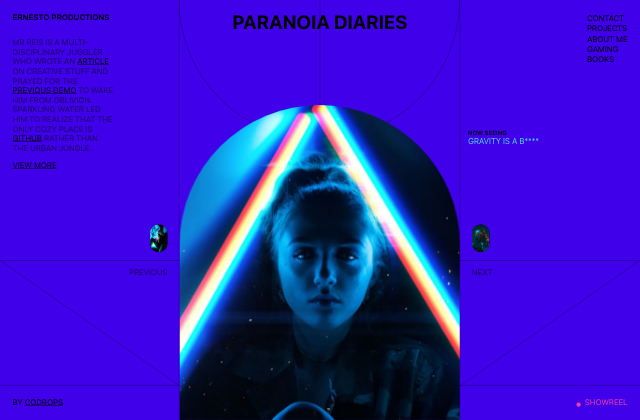
갤러리 안에서는 화면을 벗어나거나 움직임을 멈추면 예제도 닫힙니다. 다시 재생할 때는 처음부터 시작해요.
SOURCE FILES
원본 코드 읽기
수집한 원본 소스와 실행 안내를 함께 제공합니다.
src/css/base.css
*,
*::after,
*::before {
box-sizing: border-box;
}
:root {
font-size: 16px;
}
html, body {
width: 100%;
height: 100%;
}
body {
margin: 0;
--color-text: #000;
--color-text-alt: #1D0460;
--color-text-slide: #53dbf1;
--color-bg: #4000EA;
--color-link: #000;
--color-link-hover: #f33ba5;
--page-padding: 25px;
color: var(--color-text);
background-color: var(--color-bg);
font-family: termina, -apple-system, BlinkMacSystemFont, Segoe UI, Helvetica, Arial, sans-serif;
text-transform: uppercase;
-webkit-font-smoothing: antialiased;
-moz-osx-font-smoothing: grayscale;
will-change: background-color;
}
/* Page Loader */
.js .loading::before,
.js .loading::after {
content: '';
position: fixed;
z-index: 3000;
}
.js .loading::before {
top: 0;
left: 0;
width: 100%;
height: 100%;
background: var(--color-bg);
}
.js .loading::after {
top: 50%;
left: 50%;
width: 60px;
height: 60px;
margin: -30px 0 0 -30px;
border-radius: 50%;
opacity: 0.4;
background: var(--color-link);
animation: loaderAnim 0.7s linear infinite alternate forwards;
}
@keyframes loaderAnim {
to {
opacity: 1;
transform: scale3d(0.5,0.5,1);
}
}
a {
text-decoration: underline;
color: var(--color-link);
outline: none;
cursor: pointer;
}
a:hover {
text-decoration: none;
color: var(--color-link-hover);
outline: none;
}
/* Better focus styles from https://developer.mozilla.org/en-US/docs/Web/CSS/:focus-visible */
a:focus {
/* Provide a fallback style for browsers
that don't support :focus-visible */
outline: none;
background: lightgrey;
}
a:focus:not(:focus-visible) {
/* Remove the focus indicator on mouse-focus for browsers
that do support :focus-visible */
background: transparent;
}
a:focus-visible {
/* Draw a very noticeable focus style for
keyboard-focus on browsers that do support
:focus-visible */
outline: 2px solid red;
background: transparent;
}
.unbutton {
background: none;
border: 0;
padding: 0;
margin: 0;
font: inherit;
}
.unbutton:focus {
outline: none;
}
.no-select {
-webkit-touch-callout: none;
-webkit-user-select: none;
-moz-user-select: none;
-ms-user-select: none;
user-select: none;
}
.vector {
position: fixed;
pointer-events: none;
fill: none;
stroke: #000;
stroke-width: 0.5px;
width: 100%;
height: 100%;
top: 0;
left: 0;
display: none;
}
.vector--circle {
width: 44%;
left: 28%;
top: -50%;
}
.intro {
padding: var(--page-padding);
}
.intro__title {
margin: 0 0 2rem;
font-size: 1rem;
font-weight: 600;
}
.intro__description {
line-height: 1.2;
color: var(--color-text-alt);
}
.menu {
display: flex;
flex-direction: column;
padding: var(--page-padding);
justify-self: end;
line-height: 1.3;
}
.menu__item {
text-decoration: none;
}
.author {
grid-area: 2 / 1 / 4 / 2;
align-self: center;
padding-left: var(--page-padding);
}
.title {
line-height: 1;
font-size: clamp(1.75rem,3vw,15rem);
white-space: nowrap;
margin: 0;
padding: var(--page-padding);
justify-self: center;
}
.showreel {
display: flex;
align-items: center;
grid-area: 4 / 3 / 5 / 4;
align-self: center;
justify-self: end;
padding: var(--page-padding);
text-decoration: none;
color: var(--color-link-hover);
}
.showreel::before {
content: '\00B7';
font-size: 5rem;
line-height: 0;
margin: 0 0.25rem 0.25rem 0;
}
.showreel:hover::before {
animation: pulse 0.8s infinite alternate linear;
}
@keyframes pulse {
to {
transform: scale3d(1.5,1.5,1);
}
}
.slideshow {
height: 100vw;
position: relative;
display: grid;
grid-template-columns: 60px minmax(200px, 70%) 60px;
grid-template-areas: '... img ...'
'nav-prev img nav-next'
'... img ...'
'title title title';
justify-content: center;
}
.meta {
grid-area: title;
width: max-content;
text-align: center;
justify-self: center;
margin: 1rem 0 0 0;
}
.no-js .meta {
display: none;
}
.meta__heading {
font-weight: 600;
font-size: 0.75rem;
display: block;
margin: 0 0 0 0;
}
.meta__content {
color: var(--color-text-slide);
display: grid;
}
.meta__content-title {
opacity: 0;
grid-area: 1 / 1 / 2 / 2;
will-change: opacity, transform;
}
.gallery {
grid-area: img;
width: 100%;
height: 100%;
overflow: hidden;
position: relative;
margin-top: auto;
border-radius: 35vw 35vw 0 0;
justify-self: center;
}
.gallery__img {
overflow: hidden;
position: absolute;
opacity: 0;
pointer-events: none;
width: 100%;
height: 100%;
will-change: opacity, transform;
}
.no-js .gallery__img:first-child {
opacity: 1;
}
.gallery__img-inner {
width: 100%;
height: 100%;
background-size: cover;
background-position: 50% 50%;
will-change: filter, transform;
}
.nav {
text-align: center;
cursor: pointer;
display: flex;
flex-direction: column;
align-self: center;
}
.nav:hover .nav__text {
color: var(--color-link-hover);
}
.no-js .nav {
display: none;
}
.nav--prev {
grid-area: nav-prev;
align-items: flex-end;
padding-right: 15px;
}
.nav--next {
grid-area: nav-next;
align-items: flex-start;
padding-left: 15px;
}
.nav__imgwrap {
background: #000;
width: 35px;
height: 55px;
border-radius: 17px;
overflow: hidden;
position: relative;
display: grid;
grid-template-rows: 100%;
grid-template-columns: 100% 100%;
}
.nav__img {
grid-area: 1 / 1 / 2 / 2;
position: relative;
overflow: hidden;
opacity: 0;
pointer-events: none;
will-change: opacity, transform;
}
.nav__img-inner {
width: 35px;
height: 55px;
background-size: cover;
will-change: filter, transform;
}
.nav__text {
text-transform: uppercase;
cursor: pointer;
display: none;
margin-top: 3.5vh;
color: var(--color-text-alt);
}
.slides__img--current {
pointer-events: auto;
opacity: 1;
z-index: 1000;
}
@media screen and (min-width: 53em) {
body {
overflow: hidden;
}
.vector {
display: block;
}
main {
display: grid;
width: 100%;
height: 100%;
grid-template-columns: 28.05% 43.9% 28.05%;
grid-template-rows: 25% 1fr 29.5% 8.5%;
position: relative;
}
.title {
grid-area: 1 / 2 / 2 / 3;
}
.menu {
grid-area: 1 / 3 / 2 / 4;
}
.intro {
grid-area: 1 / 1 / 3 / 2;
}
.intro__description {
max-width: 20ch;
}
.gallery {
border-radius: 25vw 25vw 0 0;
width: 100%;
}
.slideshow {
height: auto;
grid-area: 2 / 2 / 5 / 3;
grid-template-columns: 4rem 43.8vw 4rem;
grid-template-rows: 38% 20% 42%;
margin-left: -4rem;
grid-template-areas: '... img title'
'nav-prev img nav-next'
'... img ...';
justify-content: start;
}
.meta {
margin: 3rem 0 0 1rem;
text-align: left;
justify-self: start;
}
.nav {
align-self: start;
}
.nav__text {
display: block;
}
.nav--prev {
padding-right: 1.5rem;
}
.nav--next {
padding-left: 1.5rem;
}
}
src/index.html
<!DOCTYPE html>
<html lang="en" class="no-js">
	<head>
		<meta charset="UTF-8" />
		<meta name="viewport" content="width=device-width, initial-scale=1">
		<title>Paranoia Slideshow | Codrops</title>
		<meta name="description" content="A slideshow page layout with a filter enhanced navigation effect on the images." />
		<meta name="keywords" content="slideshow, filter, layout, navigation, javascript, demo" />
		<meta name="author" content="Codrops" />
		<link rel="shortcut icon" href="favicon.ico">
		<link rel="stylesheet" href="https://use.typekit.net/qhs8dnq.css">
		<link rel="stylesheet" type="text/css" href="css/base.css" />
		<script>document.documentElement.className="js";var supportsCssVars=function(){var e,t=document.createElement("style");return t.innerHTML="root: { --tmp-var: bold; }",document.head.appendChild(t),e=!!(window.CSS&&window.CSS.supports&&window.CSS.supports("font-weight","var(--tmp-var)")),t.parentNode.removeChild(t),e};supportsCssVars()||alert("Please view this demo in a modern browser that supports CSS Variables.");</script>
	</head>
	<body class="loading frame">
		<main>
			<svg class="vector vector--lines" width="100%" height="100%" viewBox="0 0 1441 790" preserveAspectRatio="none" aria-hidden="true">
				<path vector-effect="non-scaling-stroke" d="M1035.5 790V0m-315 790V0m-317 790V0M.5 490h1440M.5 725h1440M.5 490l403 235m633 .5 403-235"/>
			</svg>
			<svg class="vector vector--circle" width="100%" height="100%" viewBox="0 0 634 634" preserveAspectRatio="xMidYMid meet" aria-hidden="true">
				<circle vector-effect="non-scaling-stroke" cx="316" cy="316" r="316"></circle>
			</svg>
			<h1 class="title">Paranoia Diaries</h1>
			<nav class="menu">
				<a class="menu__item" href="#">Contact</a>
				<a class="menu__item" href="#">Projects</a>
				<a class="menu__item" href="#">About me</a>
				<a class="menu__item" href="#">Gaming</a>
				<a class="menu__item" href="#">Books</a>
			</nav>
			<div class="slideshow">
				<div class="meta">
					<span class="meta__heading">Now seeing</span>
					<div class="meta__content">
						<span class="meta__content-title">Gravity is a b****</span>
						<span class="meta__content-title">Clock's not right</span>
						<span class="meta__content-title">Hot jungle speed</span>
						<span class="meta__content-title">Crisps gone wild</span>
						<span class="meta__content-title">Who's Walter?</span>
						<span class="meta__content-title">Fancy franky</span>
						<span class="meta__content-title">Step up gurl</span>
						<span class="meta__content-title">Cold eye</span>
						<span class="meta__content-title">Sparkling mind</span>
					</div>
				</div>
				<nav class="nav nav--prev">
					<div class="nav__imgwrap slides">
						<div class="nav__img slides__img"><div class="nav__img-inner slides__img-inner" style="background-image:url(img/1.jpg)"></div></div>
						<div class="nav__img slides__img"><div class="nav__img-inner slides__img-inner" style="background-image:url(img/2.jpg)"></div></div>
						<div class="nav__img slides__img"><div class="nav__img-inner slides__img-inner" style="background-image:url(img/3.jpg)"></div></div>
						<div class="nav__img slides__img"><div class="nav__img-inner slides__img-inner" style="background-image:url(img/4.jpg)"></div></div>
						<div class="nav__img slides__img"><div class="nav__img-inner slides__img-inner" style="background-image:url(img/5.jpg)"></div></div>
						<div class="nav__img slides__img"><div class="nav__img-inner slides__img-inner" style="background-image:url(img/6.jpg)"></div></div>
						<div class="nav__img slides__img"><div class="nav__img-inner slides__img-inner" style="background-image:url(img/7.jpg)"></div></div>
						<div class="nav__img slides__img"><div class="nav__img-inner slides__img-inner" style="background-image:url(img/8.jpg)"></div></div>
						<div class="nav__img slides__img"><div class="nav__img-inner slides__img-inner" style="background-image:url(img/9.jpg)"></div></div>
					</div>
					<button class="unbutton nav__text no-select">Previous</button>
				</nav>
				<nav class="nav nav--next">
					<div class="nav__imgwrap slides">
						<div class="nav__img slides__img"><div class="nav__img-inner slides__img-inner" style="background-image:url(img/1.jpg)"></div></div>
						<div class="nav__img slides__img"><div class="nav__img-inner slides__img-inner" style="background-image:url(img/2.jpg)"></div></div>
						<div class="nav__img slides__img"><div class="nav__img-inner slides__img-inner" style="background-image:url(img/3.jpg)"></div></div>
						<div class="nav__img slides__img"><div class="nav__img-inner slides__img-inner" style="background-image:url(img/4.jpg)"></div></div>
						<div class="nav__img slides__img"><div class="nav__img-inner slides__img-inner" style="background-image:url(img/5.jpg)"></div></div>
						<div class="nav__img slides__img"><div class="nav__img-inner slides__img-inner" style="background-image:url(img/6.jpg)"></div></div>
						<div class="nav__img slides__img"><div class="nav__img-inner slides__img-inner" style="background-image:url(img/7.jpg)"></div></div>
						<div class="nav__img slides__img"><div class="nav__img-inner slides__img-inner" style="background-image:url(img/8.jpg)"></div></div>
						<div class="nav__img slides__img"><div class="nav__img-inner slides__img-inner" style="background-image:url(img/9.jpg)"></div></div>
					</div>
					<button class="unbutton nav__text no-select">Next</button>
				</nav>
				<div class="gallery slides">
					<div class="gallery__img slides__img slides__img--current"><div class="gallery__img-inner slides__img-inner" style="background-image:url(img/1.jpg)"></div></div>
					<div class="gallery__img slides__img"><div class="gallery__img-inner slides__img-inner" style="background-image:url(img/2.jpg)"></div></div>
					<div class="gallery__img slides__img"><div class="gallery__img-inner slides__img-inner" style="background-image:url(img/3.jpg)"></div></div>
					<div class="gallery__img slides__img"><div class="gallery__img-inner slides__img-inner" style="background-image:url(img/4.jpg)"></div></div>
					<div class="gallery__img slides__img"><div class="gallery__img-inner slides__img-inner" style="background-image:url(img/5.jpg)"></div></div>
					<div class="gallery__img slides__img"><div class="gallery__img-inner slides__img-inner" style="background-image:url(img/6.jpg)"></div></div>
					<div class="gallery__img slides__img"><div class="gallery__img-inner slides__img-inner" style="background-image:url(img/7.jpg)"></div></div>
					<div class="gallery__img slides__img"><div class="gallery__img-inner slides__img-inner" style="background-image:url(img/8.jpg)"></div></div>
					<div class="gallery__img slides__img"><div class="gallery__img-inner slides__img-inner" style="background-image:url(img/9.jpg)"></div></div>
				</div>
			</div>
			<div class="intro">
				<h2 class="intro__title">Ernesto productions</h2>
				<p class="intro__description">
					Mr Reis is a multi-disciplinary juggler who wrote an <a href="https://tympanus.net/codrops/?p=57421">article</a> on creative stuff and prayed for the <a href="https://tympanus.net/Development/Theodore/">previous demo</a> to wake him from oblivion. Sparkling water led him to realize that the only cozy place is <a href="https://github.com/codrops/ParanoiaSlideshow">GitHub</a> rather than the urban jungle.
				</p>
				<a class="intro__link" href="https://tympanus.net/codrops/category/playground/">View more</a>
			</div>
			<div class="author">by <a href="https://twitter.com/codrops">Codrops</a></div>
			<a class="showreel" href="#" aria-label="Play the showreel video">Showreel</a>
		</main>
		<script type="module" src="js/index.js"></script>
	</body>
</html>
함께 쓰는 파일 7개 보기
src/js/index.js
import { preloadImages } from './utils';
import { Slideshow } from './slideshow';
import gsap from 'gsap';

// body element
const bodyEl = document.body;
// body color
const bodyColor = getComputedStyle(bodyEl).getPropertyValue('--color-bg');
// Three Slideshow instances: main, and two for the navigation items
const slideshowMain = new Slideshow(document.querySelector('.slideshow > div.slides'));
const slideshowNavNext = new Slideshow(document.querySelector('.slideshow nav.nav--next .slides'), {duration: 1, filtersAnimation: false});
const slideshowNavPrev = new Slideshow(document.querySelector('.slideshow nav.nav--prev .slides'), {duration: 1, filtersAnimation: false});
// Nav controls to navigate the main slideshow
const navCtrls = {
    prev: document.querySelector('.slideshow nav.nav--prev'),
    next: document.querySelector('.slideshow nav.nav--next')
};
// title elements
const titleElems = [...document.querySelectorAll('.meta__content > .meta__content-title')];

// Animates the body color
const animateBodyBGColor = () => {

    gsap.timeline()
    .to(bodyEl, {
        duration: slideshowMain.duration/2,
        ease: 'power3.in',
        backgroundColor: '#2b0889'
    }, 'start')
    .to(bodyEl, {
        duration: slideshowMain.duration,
        ease: 'power3',
        backgroundColor: bodyColor
    }, 'start+=' + slideshowMain.duration/2);

}

// Set the current slide
slideshowMain.setInitialSlide();
// Set up the current slide values for the navigation elements, which are based on the slideshowMain's current value
slideshowNavPrev.setInitialSlide(slideshowMain.current ? slideshowMain.current - 1 : slideshowMain.slidesTotal - 1);
slideshowNavNext.setInitialSlide(slideshowMain.current < slideshowMain.slidesTotal - 1 ? slideshowMain.current + 1 : 0);

// Set initial title
gsap.set(titleElems[slideshowMain.current], {opacity: 1});

// Change slides for the three slideshows
const onClickNavCtrlEv = (dir) => {

    if ( slideshowMain.isAnimating ) return;

    // Slide out current title
    gsap.to(titleElems[slideshowMain.current], {
        duration: slideshowMain.duration/2,
        ease: 'power3.in',
        y: dir === 'next' ? '-100%' : '100%',
        opacity: 0
    });

    slideshowMain[dir]();
    slideshowNavPrev[dir]();
    slideshowNavNext[dir]();
    animateBodyBGColor();

    // Slide in the new (current) title
    gsap.to(titleElems[slideshowMain.current], {
        duration: slideshowMain.duration/2,
        ease: 'power3',
        startAt: {y: dir === 'next' ? '100%' : '-100%'},
        y: '0%',
        opacity: 1,
        delay: slideshowMain.duration/2
    });

};
navCtrls.prev.addEventListener('click', () => onClickNavCtrlEv('prev'));
navCtrls.next.addEventListener('click', () => onClickNavCtrlEv('next'));


// Preload images then remove loader (loading class)
preloadImages('.slides__img-inner').then(() => document.body.classList.remove('loading'));
src/js/slide.js
import gsap from "gsap/gsap-core";

/**
 * Class representing an image slide,
 * where each one consists of an outer element and an inner element that contains a background image.
 * */
export class Slide {
    // DOM elements
    DOM = {
        // Wrapper element (outer element)
        outer: null,
        // Image element (inner element)
        inner: null
    };

    constructor(DOM_el) {

        this.DOM.outer = DOM_el;
        this.DOM.inner = this.DOM.outer.children[0];

    }
}
src/js/slideshow.js
import { Slide } from './slide';
import { gsap } from 'gsap';

export class Slideshow {

    // DOM elements
    DOM = {
        // Main element .slides
        el: null,
        // .slides__img elements
        slides: null
    };
    // Slide instances array
    slidesArr = [];
    // Current slide's index
    current = 0;
    // Total number of slides
    slidesTotal;
    // Current Slide
    currentSlide;
    // Animation's direction (left or right)
    direction;
    // Checks if the slideshow is running
    isAnimating = false;
    // Animation's duration and easing
    duration = 1.2;
    ease = 'power3.inOut';
    // Use a filter (brighness) animation when transitioning from one slide to another
    filtersAnimation = true;

    constructor(DOM_el, options = {} ) {

        this.DOM.el = DOM_el;

        // Some options
        this.duration = options.duration != undefined ? options.duration : this.duration;
        this.ease = options.ease != undefined ? options.ease : this.ease;
        this.filtersAnimation = options.filtersAnimation != undefined ? options.filtersAnimation : this.filtersAnimation;

        this.DOM.slides = this.DOM.el.querySelectorAll('.slides__img');

        // Create a Slide for each .slides__img element
        this.DOM.slides.forEach(slideEl => this.slidesArr.push(new Slide(slideEl)));

        this.slidesTotal = this.DOM.slides.length;

    }

    /**
     * Set the current slide
     * @param {number} position - The position of the slide.
     */
    setInitialSlide(position = this.current) {

        // Update current
        this.current = position;
        // The current Slide
        this.currentSlide = this.slidesArr[this.current];
        // Set current image
        this.DOM.slides[this.current].classList.add('slides__img--current');

    }

    /**
     * Navigate the slideshow to the next slide.
     */
    next() {

        // Return if anything is running
        if ( this.isAnimating ) return;

        // direction
        this.direction = 'next';

        // Update current
        this.current = this.current < this.slidesTotal - 1 ? this.current+1 : 0;

        // Animate to a different slide
        this.navigate();

    }

    /**
     * Navigate the slideshow to the previous slide.
     */
    prev() {

        // Return if anything is running
        if ( this.isAnimating ) return;

        // direction
        this.direction = 'prev';

        // Update current
        this.current = this.current > 0 ? this.current-1 : this.slidesTotal - 1;

        // Animate to a different slide
        this.navigate();

    }

    /**
     * Navigate to a different slide
     * @param {number} position - The position of the new slide.
     */
    navigate(position = this.current) {

        this.isAnimating = true;

        // Update current
        this.current = position;

        // Upcoming Slide
        this.upcomingSlide = this.slidesArr[this.current];

        // Animation
        this.timeline = gsap.timeline({
            defaults: {
                duration: this.duration,
                ease: this.ease
            },
            onComplete: () => {
                // Current class switch
                this.currentSlide.DOM.outer.classList.remove('slides__img--current');
                this.upcomingSlide.DOM.outer.classList.add('slides__img--current');
                // Update current Slide
                this.currentSlide = this.slidesArr[this.current];

                this.isAnimating = false;
            }
        })
        .addLabel('start', 0)

        // Upcoming Slide gets shown behind the current Slide animates out
        .set(this.upcomingSlide.DOM.outer, {
            opacity: 1
        }, 'start')

        // outer/inner opposite translations (Reveal effect)
        .to(this.currentSlide.DOM.outer, {
            x: this.direction === 'next' ? '-101%' : '101%',
            onComplete: () => gsap.set(this.currentSlide.DOM.outer, {x: '0%', opacity: 0})
        }, 'start')
        .to(this.currentSlide.DOM.inner, {
            x: this.direction === 'next' ? '101%' : '-101%',
            onComplete: () => gsap.set(this.currentSlide.DOM.inner, {x: '0%'})
        }, 'start')

        // Filters animation
        if ( this.filtersAnimation ) {

            this.timeline.to(this.currentSlide.DOM.inner, {
                startAt: {filter: 'brightness(100%)'},
                filter: 'brightness(800%)',
                onComplete: () => gsap.set(this.currentSlide.DOM.inner, {filter: 'brightness(100%)'})
            }, 'start')
            .to(this.upcomingSlide.DOM.inner, {
                startAt: {filter: 'brightness(800%)'},
                filter: 'brightness(100%)'
            }, 'start');

        }


    }
}
src/js/utils.js
const imagesLoaded = require('imagesloaded');

// Preload images
const preloadImages = (selector = 'img') => {
    return new Promise((resolve) => {
        imagesLoaded(document.querySelectorAll(selector), {background: true}, resolve);
    });
};

export {
    preloadImages
};
Media credits and license evidence실행 안내·자료
README.md
## Credits

- Images from [Unsplash](https://unsplash.com/)


## License
[MIT](LICENSE)

Made with :blue_heart:  by [Codrops](http://www.codrops.com)
LICENSE실행 안내·자료
MIT License

Copyright (c) 2009 - 2021 [Codrops](https://tympanus.net/codrops)

Permission is hereby granted, free of charge, to any person obtaining a copy
of this software and associated documentation files (the "Software"), to deal
in the Software without restriction, including without limitation the rights
to use, copy, modify, merge, publish, distribute, sublicense, and/or sell
copies of the Software, and to permit persons to whom the Software is
furnished to do so, subject to the following conditions:

The above copyright notice and this permission notice shall be included in all
copies or substantial portions of the Software.

THE SOFTWARE IS PROVIDED "AS IS", WITHOUT WARRANTY OF ANY KIND, EXPRESS OR
IMPLIED, INCLUDING BUT NOT LIMITED TO THE WARRANTIES OF MERCHANTABILITY,
FITNESS FOR A PARTICULAR PURPOSE AND NONINFRINGEMENT. IN NO EVENT SHALL THE
AUTHORS OR COPYRIGHT HOLDERS BE LIABLE FOR ANY CLAIM, DAMAGES OR OTHER
LIABILITY, WHETHER IN AN ACTION OF CONTRACT, TORT OR OTHERWISE, ARISING FROM,
OUT OF OR IN CONNECTION WITH THE SOFTWARE OR THE USE OR OTHER DEALINGS IN THE
SOFTWARE.
Bundled dependency licenses실행 안내·자료
GSAP standard license snapshot
Source: https://gsap.com/community/standard-license/
Retrieved: 2026-09-22T04:22:49.089Z
Original distribution copyright and version headers remain in the runtime code.

Standard "No Charge" GSAP License

 I. DEFINITIONS

 “GSAP License” means the terms and conditions of this GSAP Software License Agreement.

 "GSAP Products" means any Software made available at gsap.com (https://gsap.com) or any successor sites, including but not limited to the GSAP animation library and related plugins, tools, or extensions.

 "Permitted Uses" means the implementation and/or use of GSAP Products on any website, web application, or digital interface by any person or entity (which may include, for clarity, those of companies that compete with Webflow in other areas of business).

 "Prohibited Uses" means any implementation and/or use of GSAP Products in tools that allow users to build visual animations without code that encourages, induces, or materially assists in creating a solution that competes with Webflow’s visual animation building capabilities.

 "Competitive Products" means any software, tool, or service that enables users to create, edit, or manage animations through a visual interface or builder similar to Webflow (https://webflow.com).

 II. GRANT OF LICENSE

 Subject to the terms and conditions of this GSAP License, Webflow grants you a non-exclusive, worldwide license to use, reproduce, display, and implement GSAP Products solely for Permitted Uses.

 III. RESTRICTIONS

 You may not:

 Use any GSAP Products for any Prohibited Uses without prior written consent;

 Reverse engineer any GSAP Products for the purpose of creating Competitive Products;

 Remove or alter any proprietary notices or branding from GSAP Products.

 IV. OWNERSHIP AND INTELLECTUAL PROPERTY

 All intellectual property rights in GSAP Products, including but not limited to copyright, patents, trademarks, and trade secrets, remain the exclusive property of Webflow. This GSAP License does not transfer any ownership rights in GSAP Products to you.

 V. TERMINATION

 Webflow may terminate this GSAP License and revoke your access in its discretion if you fail to comply with any of these terms and conditions. Upon termination, you must cease all use of GSAP Products and destroy all copies in your possession.

 VI. MISCELLANEOUS PROVISIONS

 General: This GSAP License is incorporated into and subject to Webflow’s Terms of Service available here (https://webflow.com/legal/terms) ("Terms of Service"). In the event of any conflict or inconsistency between this GSAP License and the Terms of Service, the terms of this GSAP License shall govern in relation to your use of any GSAP Products.

 Amendments: Webflow reserves the right to update or modify this GSAP License at any time by posting the revised terms on this website, provided that any such updates or modifications shall not result in any material degradation to the security, integrity, or functionality of any GSAP Products. You understand and agree that your continued use of any GSAP Products after such revisions to this GSAP License constitutes your acceptance of this GSAP License as revised. If you do not accept the revised GSAP License, you are prohibited from using versions of the GSAP Products released after the effective date of the revised GSAP License (as well as any updates made to previous versions). Notwithstanding, you may continue using previous versions of GSAP Products under the applicable terms licensed to you prior to the effective date of the revised GSAP License (for clarity, excluding any updates made thereto).

 No Waiver: Failure of Webflow to enforce any provision of this GSAP License shall not constitute a waiver of future enforcement of that or any other provision.

 FAQ

 Is it acceptable for AI tools like ChatGPT, Cursor, Lovable, Webstudio, etc. to generate GSAP code?
 Absolutely! AI-generated code is not a "Prohibited Use".

 What if a WordPress plugin or theme or other niche tool allows users to create GSAP-driven effects through a visual interface? Is that prohibited?
 We want to encourage developers to build on top of GSAP, including visual tools that don't directly compete with Webflow's rich animation-building capabilities. If you are not sure if your product might be considered a "Prohibited Use", feel free to contact us (https://gsap.com/contact) so we can talk through it!

 Can I really use GSAP in commercial projects without paying anything?
 Yes, really! Commercial usage is covered under the standard license. All of GSAP including the plugins that were formerly "members-only" like SplitText (https://gsap.com/docs/v3/Plugins/SplitText/) and MorphSVG (https://gsap.com/docs/v3/Plugins/MorphSVGPlugin) can be used in commercial projects at no charge. Enjoy! 💚

 Effective date: April 30, 2025

 Last modified date: May 30, 2025

 Copyright (©) 2025, Webflow
BEHIND THE EXAMPLE
이 장면을 만드는 원리
바깥 이미지와 안쪽 이미지의 반대 이동
화면 크기·입력·동시 작업을 고정하고 실제 렌더링 실패와 비용을 관찰합니다.
- 이 예제에서는
- Slideshow.navigate는 outer를 ±101%, inner를 반대 방향으로 움직여 가려지는 경계를 만듭니다. filtersAnimation을 켜면 밝기도 800%를 경유합니다.
코드와 함께 확인하기
코드에서 찾기
navigateslideshow.js반대 이동과 선택적 밝기 전환을 같은 타임라인에 넣습니다.
직접 해보기
next·prev 양방향과 필터 on/off를 비교합니다.
살펴볼 변화경계의 빈틈과 밝기 변화의 실제 노출을 확인하고 필터를 꺼도 이미지 전환이 완성되어야 합니다.