GSAP 사례 연구
Orchestrated easeReverse
탐색 · MIT (local companion); GSAP Standard No Charge License (runtime)
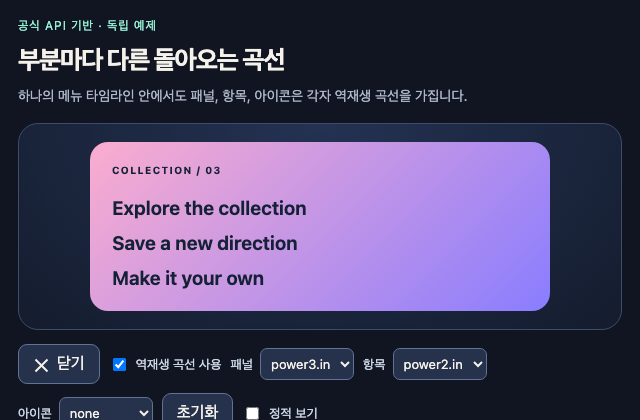
갤러리 안에서는 화면을 벗어나거나 움직임을 멈추면 예제도 닫힙니다. 다시 재생할 때는 처음부터 시작해요.
저장한 HTML에서는 갤러리의 재생 설정이 적용되지 않아요.
SOURCE FILES
독립 예제 코드 읽기
사례의 구도나 문서의 원리를 바탕으로 새로 만든 예제입니다. 아래 코드를 복사해 직접 응용할 수 있습니다. 실행 HTML에는 미리보기를 위한 실행 환경이 들어 있습니다.
vendor/gsap-previews/sources/gsap-8e939656defe/study-brief.json실행 안내·자료
{
  "id": "gsap-8e939656defe",
  "sourceId": "gsap",
  "title": "Orchestrated easeReverse",
  "sourceUrl": "https://demos.gsap.com/demo/orchestrated-easereverse",
  "demoUrl": "https://codepen.io/GreenSock/pen/JoRMPLg",
  "sourceStatus": "unresolved",
  "sourceReason": "Public page unavailable through web browsing",
  "sourceRevision": null,
  "sourceLicense": null,
  "originalDemoAcquired": false,
  "disposition": "ready_for_independent_study",
  "evidenceBasis": "catalog_explanation_and_linked_api",
  "studyId": "gsap-8e939656defe",
  "sharedStudyCanonicalId": null,
  "label": "Independently authored documentation study; original Pen unavailable",
  "catalogEvidence": {
    "localPath": "artifacts/full-import/gsap/remaining-docs/catalog-evidence.json",
    "sha256": "4f2a4f9aa64456b85b905b562b60d7733629b41026787b3057cba29e8b10de69",
    "bytes": 30117,
    "recordId": "gsap-8e939656defe"
  },
  "sourceInputs": [
    {
      "kind": "authored-study-specification",
      "localPath": "artifacts/full-import/gsap/remaining-docs/study-specs.json",
      "sha256": "cbb89331eda8783b5cf2f173b326b9195eeabfb223374fb60019161d9f46d4a6",
      "bytes": 52279,
      "recordId": "gsap-8e939656defe"
    },
    {
      "kind": "official-catalog-metadata",
      "localPath": "artifacts/full-import/gsap/remaining-docs/catalog-evidence.json",
      "sha256": "4f2a4f9aa64456b85b905b562b60d7733629b41026787b3057cba29e8b10de69",
      "bytes": 30117,
      "recordId": "gsap-8e939656defe"
    },
    {
      "kind": "official-documentation-evidence",
      "localPath": "artifacts/full-import/gsap/remaining-docs/official-documentation-evidence.json",
      "sha256": "bfa25f561e61c597569cf1bc0b3538e6dce4b9985a932775ceab41e665ca24a2",
      "bytes": 11430,
      "recordIds": [
        "tween",
        "reversed"
      ]
    },
    {
      "kind": "original-library-source",
      "localPath": "artifacts/full-import/gsap/library/src/gsap-core.js",
      "sha256": "8063816e0e7c3e6c07970fb06feafb06146fd266db5d8346419176b3d496e284",
      "gitBlob": "c673b9e2e0ee04832afb13cb892ae75f503e268c",
      "revision": "13e2b790546426a1a2e0e9b409f3f8dc6d6611f2",
      "sourcePath": "src/gsap-core.js",
      "ranges": [
        {
          "id": "direction-controls",
          "startLine": 1354,
          "endLine": 1391,
          "rangeSha256": "8e2f36127b2fc568686d2d934ad3b74a21274c78bf1045d210e376260598819f"
        },
        {
          "id": "reverse-ease",
          "startLine": 2114,
          "endLine": 2136,
          "rangeSha256": "a94b1617e88c0c3328ce1d2038eaa0d44a03612cf5b33cbfeac7140245698555"
        }
      ]
    }
  ],
  "studiedPrinciple": "Coordinate several UI tweens in one timeline while assigning each child its own easeReverse response.",
  "namedApis": [
    {
      "name": "easeReverse on each child tween",
      "purpose": "Choose reverse easing independently for the panel, items, and icon.",
      "libraryEvidence": [
        "reverse-ease"
      ],
      "documentationEvidence": [
        "tween"
      ],
      "minimumVersion": "3.15.0"
    },
    {
      "name": "timeline.play() and timeline.reverse()",
      "purpose": "Reverse the existing orchestration from its current position.",
      "libraryEvidence": [
        "direction-controls"
      ],
      "documentationEvidence": [
        "reversed"
      ]
    }
  ],
  "implementationBrief": {
    "scene": "A newly authored compact menu with one panel, three item labels, and a simple two-bar icon. A settings area identifies the forward and reverse easing for each part.",
    "controls": [
      {
        "label": "Open / Close",
        "type": "button",
        "action": "Play or reverse the existing timeline from its current position."
      },
      {
        "label": "Reverse easing",
        "type": "checkbox",
        "action": "Rebuild from the closed base state with explicit easeReverse values or false for comparison."
      },
      {
        "label": "Panel / Items / Icon reverse ease",
        "type": "three selects",
        "action": "Choose none, power2.in, or power3.in for each child group; reset closed and rebuild after a setting changes."
      },
      {
        "label": "Reset",
        "type": "button",
        "action": "Restore the authored closed state and clear any pending motion."
      }
    ],
    "mechanismSteps": [
      "Create a paused timeline containing separate child tweens for the panel, staggered item labels, and icon.",
      "Assign the selected easeReverse value to every affected child tween. Do not place it only on the parent timeline and assume it becomes an orchestration-level effect.",
      "Keep an explicit desiredOpen state. Opening calls play(); closing calls reverse() on the same timeline so mid-entry interruptions can be inspected.",
      "Recreate the timeline from declared closed styles when ease settings change. This study intentionally resets on setting changes rather than claiming continuity across a rebuilt configuration.",
      "Display the currently selected forward and reverse eases, and distinguish disabled easeReverse:false from using an ease string."
    ]
  },
  "authoredDefaults": {
    "panel": {
      "duration": 0.65,
      "ease": "back.out(1.4)",
      "easeReverse": "power3.in"
    },
    "items": {
      "count": 3,
      "duration": 0.4,
      "stagger": 0.08,
      "ease": "power2.out",
      "easeReverse": "power2.in"
    },
    "icon": {
      "duration": 0.3,
      "ease": "power1.inOut",
      "easeReverse": "none"
    },
    "parameterChangePolicy": "reset closed and rebuild"
  },
  "verificationRequired": [
    "Child tween vars contain the selected easeReverse values, and the loaded GSAP version is at least 3.15.0.",
    "Reverse halfway through entrance continues from the current rendered values without snapping to a new start.",
    "Changing a setting visibly resets to the declared closed state and leaves only one owned timeline.",
    "Disabled reverse easing and different selected eases produce inspectable motion while endpoint states stay consistent."
  ],
  "unsupportedClaims": [
    "Original composition, assets, timing, breakpoint behavior, and live interaction are not observable in captured frames. This brief does not establish visual fidelity or recover original code.",
    "Original object count, menu artwork, exact durations, setting choices, and choreography offsets are unknown.",
    "The study does not establish a perceptual ranking of the easing choices."
  ],
  "dependencies": {
    "package": "gsap",
    "version": "3.15.0",
    "revision": "13e2b790546426a1a2e0e9b409f3f8dc6d6611f2",
    "repository": "https://github.com/greensock/GSAP",
    "plugins": [],
    "registration": "Core includes CSSPlugin; no separate plugin registration required.",
    "runtimeCandidates": [
      {
        "path": "dist/gsap.js",
        "localPath": "artifacts/full-import/gsap/library/dist/gsap.js",
        "gitBlob": "ec5ffee3f099bc454f2f1c79cee6a55ba97e7400",
        "sha256": "01effe0e121c22ba0f885a3f091f3dc6d1f0d445c4fba37dcb298e314eca5cfb",
        "bytes": 179557
      }
    ],
    "license": {
      "name": "GSAP Standard 'No Charge' License (custom, not MIT)",
      "localPath": "artifacts/full-import/gsap/licenses/gsap-standard-license.html",
      "sha256": "bf8536e67b77db780f7db0c14a645f184f554bb19e938d1e52d58986e2f10528",
      "bytes": 6988,
      "url": "https://gsap.com/community/standard-license/"
    },
    "originalDependencyVersionKnown": false
  },
  "runtimeVerified": false,
  "implementationWritten": false
}
vendor/gsap-previews/sources/gsap-8e939656defe/source-inputs.json실행 안내·자료
[
  {
    "kind": "authored-study-specification",
    "localPath": "artifacts/full-import/gsap/remaining-docs/study-specs.json",
    "sha256": "cbb89331eda8783b5cf2f173b326b9195eeabfb223374fb60019161d9f46d4a6",
    "bytes": 52279,
    "recordId": "gsap-8e939656defe"
  },
  {
    "kind": "official-catalog-metadata",
    "localPath": "artifacts/full-import/gsap/remaining-docs/catalog-evidence.json",
    "sha256": "4f2a4f9aa64456b85b905b562b60d7733629b41026787b3057cba29e8b10de69",
    "bytes": 30117,
    "recordId": "gsap-8e939656defe"
  },
  {
    "kind": "official-documentation-evidence",
    "localPath": "artifacts/full-import/gsap/remaining-docs/official-documentation-evidence.json",
    "sha256": "bfa25f561e61c597569cf1bc0b3538e6dce4b9985a932775ceab41e665ca24a2",
    "bytes": 11430,
    "recordIds": [
      "tween",
      "reversed"
    ]
  },
  {
    "kind": "original-library-source",
    "localPath": "artifacts/full-import/gsap/library/src/gsap-core.js",
    "sha256": "8063816e0e7c3e6c07970fb06feafb06146fd266db5d8346419176b3d496e284",
    "gitBlob": "c673b9e2e0ee04832afb13cb892ae75f503e268c",
    "revision": "13e2b790546426a1a2e0e9b409f3f8dc6d6611f2",
    "sourcePath": "src/gsap-core.js",
    "ranges": [
      {
        "id": "direction-controls",
        "startLine": 1354,
        "endLine": 1391,
        "rangeSha256": "8e2f36127b2fc568686d2d934ad3b74a21274c78bf1045d210e376260598819f"
      },
      {
        "id": "reverse-ease",
        "startLine": 2114,
        "endLine": 2136,
        "rangeSha256": "a94b1617e88c0c3328ce1d2038eaa0d44a03612cf5b33cbfeac7140245698555"
      }
    ]
  }
]
함께 쓰는 파일 4개 보기
vendor/gsap-previews/sources/gsap-8e939656defe/index.html실행 안내·자료
<main class="study"><p class="study-label">공식 API 기반 · 독립 예제</p><header><h2>부분마다 다른 돌아오는 곡선</h2><p>하나의 메뉴 타임라인 안에서도 패널, 항목, 아이콘은 각자 역재생 곡선을 가집니다.</p></header><div class="stage menu-stage"><div class="orchestrated-panel"><div class="orchestrated-eyebrow">COLLECTION / 03</div><ul><li>Explore the collection</li><li>Save a new direction</li><li>Make it your own</li></ul></div></div><div class="controls"><button id="toggle" type="button"><span class="icon-bars" aria-hidden="true"><span></span><span></span></span><span id="toggle-label">닫기</span></button><label><input id="reverse-enabled" type="checkbox" checked>역재생 곡선 사용</label><label>패널<select id="panel-ease"><option>none</option><option>power2.in</option><option selected>power3.in</option></select></label><label>항목<select id="item-ease"><option>none</option><option selected>power2.in</option><option>power3.in</option></select></label><label>아이콘<select id="icon-ease"><option selected>none</option><option>power2.in</option><option>power3.in</option></select></label><button id="reset" type="button">초기화</button><label><input id="static-mode" type="checkbox">정적 보기</label></div><p class="readout" id="reading" aria-live="off"></p></main>vendor/gsap-previews/sources/gsap-8e939656defe/style.css실행 안내·자료
*{box-sizing:border-box}body{background:#111522;color:#f5f2eb;font-family:system-ui,sans-serif;margin:0}button{font:inherit}.study{margin:0 auto;max-width:1100px;min-height:100vh;padding:clamp(20px,4vw,42px)}.study-label{color:#95efd2;font-size:12px;letter-spacing:.08em;margin:0 0 24px}header h2{font-size:clamp(24px,4vw,40px);letter-spacing:-.04em;margin:0 0 12px}header p{color:#aeb7c9;line-height:1.6;margin:0 0 24px;max-width:62ch}.controls{display:flex;flex-wrap:wrap;gap:8px;margin:20px 0}button{background:#26314b;border:1px solid #617394;border-radius:9px;color:#f5f2eb;cursor:pointer;padding:9px 14px}button:hover{background:#334261}button:focus-visible{outline:3px solid #95efd2;outline-offset:3px}button:disabled{cursor:default;opacity:.45}.stage{align-items:center;background:radial-gradient(ellipse at top,#243253,#141c2d);border:1px solid #3d4c68;border-radius:20px;display:flex;justify-content:center;min-height:220px;overflow:hidden;position:relative}.note{color:#aeb7c9;font-size:13px;line-height:1.5}.readout{color:#95efd2;font-family:ui-monospace,monospace;font-size:13px;min-height:2em}.stage svg{display:block;max-width:100%}code{font-family:ui-monospace,monospace}button[aria-pressed="true"]{background:#95efd2;color:#111522}


.study{padding:18px;max-width:960px}.study-label{margin-bottom:10px}header h2{font-size:clamp(22px,4vw,32px);margin-bottom:8px}header p{font-size:14px;margin-bottom:16px}.controls{align-items:center;gap:9px;margin:14px 0}.controls label{align-items:center;color:#cbd4e3;display:flex;flex-wrap:wrap;font-size:13px;gap:7px}.controls input[type=range]{accent-color:#95efd2;max-width:145px}.controls select{background:#26314b;border:1px solid #617394;border-radius:7px;color:#f5f2eb;font:inherit;padding:6px}.stage{min-height:180px}.readout{line-height:1.5;margin:8px 0}.small-code{background:#172036;border:1px solid #354258;border-radius:10px;color:#c3d1e7;font-size:12px;line-height:1.5;max-height:180px;overflow:auto;padding:12px;white-space:pre-wrap;word-break:break-word}.pair{display:flex;gap:12px;justify-content:center}.pair figure{flex:1;margin:0;max-width:300px;min-width:0;padding:8px}.pair figcaption{color:#aeb7c9;font-family:ui-monospace,monospace;font-size:12px;margin-bottom:6px;text-align:center}.pair svg{display:block;max-height:210px;width:100%}.tile-art{align-items:center;border-radius:14px;color:#152039;display:flex;justify-content:center}.tile-art svg{height:65%;width:65%}.menu-stage{min-height:196px;padding:18px}.menu-panels{display:flex;gap:10px;max-width:570px;width:100%}.menu-panel{align-items:center;background:linear-gradient(135deg,#95efd2,#75d8ed);border-radius:14px;color:#142137;display:flex;flex:1;flex-direction:column;font-weight:650;gap:10px;justify-content:center;min-height:135px;min-width:0;padding:12px}.menu-panel:nth-child(2){background:linear-gradient(135deg,#fbadce,#897dff)}.menu-panel:nth-child(3){background:linear-gradient(135deg,#ffd28c,#fc7f8e)}.menu-panel svg{height:58px;width:58px}.icon-bars{display:inline-flex;flex-direction:column;gap:5px;margin-right:7px;vertical-align:middle}.icon-bars span{background:currentColor;display:block;height:2px;width:17px}.endpoint-note{color:#aeb7c9;font-size:12px;line-height:1.5}button[hidden],[hidden]{display:none!important}@media(max-width:380px){.study{padding:14px}.controls label{max-width:100%}.menu-panels{gap:6px}.menu-panel{font-size:12px;padding:7px}.pair{gap:0}}

.orchestrated-panel{background:linear-gradient(135deg,#fbadce,#897dff);border-radius:18px;color:#142137;max-width:460px;padding:22px;width:100%}.orchestrated-eyebrow{font-size:10px;font-weight:750;letter-spacing:.13em}.orchestrated-panel ul{display:flex;flex-direction:column;gap:12px;list-style:none;margin:20px 0 0;padding:0}.orchestrated-panel li{font-size:clamp(15px,3vw,21px);font-weight:650}vendor/gsap-previews/sources/gsap-8e939656defe/script.js실행 안내·자료
gsap.registerPlugin();

const q=selector=>document.querySelector(selector),qa=selector=>Array.from(document.querySelectorAll(selector));
const studyAbort=new AbortController(),studyCleanup=[];
const listen=(target,type,handler)=>target.addEventListener(type,handler,{signal:studyAbort.signal});
const preference=matchMedia('(prefers-reduced-motion: reduce)'),staticControl=q('#static-mode');
staticControl.checked=preference.matches;staticControl.disabled=preference.matches;
const isStatic=()=>staticControl.checked||preference.matches;
let applyMode=()=>{};
listen(staticControl,'change',()=>applyMode());
listen(preference,'change',()=>{staticControl.checked=preference.matches;staticControl.disabled=preference.matches;applyMode();});
listen(window,'pagehide',()=>{studyCleanup.forEach(cleanup=>cleanup());studyAbort.abort();});
const reading=text=>q('#reading').textContent=text;

const panel=q('.orchestrated-panel'),items=qa('.orchestrated-panel li'),bars=qa('.icon-bars span');let orchestrated=null,desiredOpen=true;
const selectedEase=selector=>q('#reverse-enabled').checked?q(selector).value:false;
function reflect(){q('#toggle-label').textContent=desiredOpen?'닫기':'열기';q('#toggle').setAttribute('aria-expanded',String(desiredOpen));panel.setAttribute('aria-hidden',String(!desiredOpen));reading('역재생 · 패널 '+selectedEase('#panel-ease')+' / 항목 '+selectedEase('#item-ease')+' / 아이콘 '+selectedEase('#icon-ease'));}
function buildOrchestration(open=false){orchestrated?.kill();desiredOpen=open;gsap.set(panel,{x:0,autoAlpha:1});gsap.set(items,{y:0,autoAlpha:1});gsap.set(bars,{y:0,rotation:0});
orchestrated=gsap.timeline({paused:true})
.fromTo(panel,{x:-100,autoAlpha:0},{x:0,autoAlpha:1,duration:.65,ease:'back.out(1.4)',easeReverse:selectedEase('#panel-ease')},0)
.fromTo(items,{y:30,autoAlpha:0},{y:0,autoAlpha:1,duration:.4,stagger:.08,ease:'power2.out',easeReverse:selectedEase('#item-ease')},.2)
.fromTo(bars[0],{y:0,rotation:0},{y:3.5,rotation:45,duration:.3,ease:'power1.inOut',easeReverse:selectedEase('#icon-ease')},0)
.fromTo(bars[1],{y:0,rotation:0},{y:-3.5,rotation:-45,duration:.3,ease:'power1.inOut',easeReverse:selectedEase('#icon-ease')},0);
orchestrated.progress(open?1:0,true).pause();reflect();}
listen(q('#toggle'),'click',()=>{desiredOpen=!desiredOpen;if(isStatic())orchestrated.pause().progress(desiredOpen?1:0,true);else desiredOpen?orchestrated.play():orchestrated.reverse();reflect();});
for(const selector of ['#reverse-enabled','#panel-ease','#item-ease','#icon-ease'])listen(q(selector),'change',()=>buildOrchestration(false));listen(q('#reset'),'click',()=>buildOrchestration(false));applyMode=()=>buildOrchestration(true);studyCleanup.push(()=>orchestrated?.kill());applyMode();LICENSE실행 안내·자료
Locally authored companion HTML/CSS/control wiring: MIT License.
Copyright (c) 2026 StyleGallery contributors

Permission is hereby granted, free of charge, to any person obtaining a copy of this software and associated documentation files (the "Software"), to deal in the Software without restriction, including without limitation the rights to use, copy, modify, merge, publish, distribute, sublicense, and/or sell copies of the Software, and to permit persons to whom the Software is furnished to do so, subject to the following conditions:

The above copyright notice and this permission notice shall be included in all copies or substantial portions of the Software.

THE SOFTWARE IS PROVIDED "AS IS", WITHOUT WARRANTY OF ANY KIND, EXPRESS OR IMPLIED, INCLUDING BUT NOT LIMITED TO THE WARRANTIES OF MERCHANTABILITY, FITNESS FOR A PARTICULAR PURPOSE AND NONINFRINGEMENT. IN NO EVENT SHALL THE AUTHORS OR COPYRIGHT HOLDERS BE LIABLE FOR ANY CLAIM, DAMAGES OR OTHER LIABILITY, WHETHER IN AN ACTION OF CONTRACT, TORT OR OTHERWISE, ARISING FROM, OUT OF OR IN CONNECTION WITH THE SOFTWARE OR THE USE OR OTHER DEALINGS IN THE SOFTWARE.

The typed source-inputs.json and study-brief.json preserve official catalog, documentation and original library source pointers. This is independently authored API research, not a recovered CodePen source or documentation snippet. The local MIT notice does not assign new licenses to referenced third-party sources.
GSAP 3.15.0: Copyright 2026, GreenSock. All rights reserved. Subject to https://gsap.com/standard-license. Original library notices are preserved.
BEHIND THE EXAMPLE
이 장면을 만드는 원리
자식마다 지정한 역재생 곡선
한 장면의 공동 시간축과 각 부분의 보간 방식을 구분하여 구성합니다.
- 이 예제에서는
- 독립 메뉴는 패널·세 항목·아이콘 막대에 각각 easeReverse를 지정합니다. 메뉴를 중간에서 바꾸면 같은 타임라인을 play·reverse하고 곡선 설정을 바꾸면 이전 효과를 제거한 뒤 닫힘 상태로 다시 구성합니다. 부모 타임라인에 설정 하나만 붙여 모든 자식이 같은 역재생 곡선을 따른다고 설명하지 않습니다.
코드와 함께 확인하기
코드에서 찾기
function buildOrchestrationscript.js각 자식의 easeReverse 값을 실제 입력 설정에서 읽어 구성합니다.
easeReverse:selectedEase('#item-ease')script.js항목의 역재생 곡선을 패널·아이콘과 별도로 지정합니다.
직접 해보기
등장 중 방향을 바꾸고 역재생 곡선 사용을 켜거나 끕니다.
살펴볼 변화자식별 설정 차이와 공통 시간축을 실제 움직임에서 확인합니다.
열린 상태에서 각 곡선을 바꾼 뒤 다시 엽니다.
살펴볼 변화닫힌 기준 상태로 재구성되고 이전 트윈이나 아이콘 회전이 누적되지 않아야 합니다.