Codrops 원본
Building an Infinite Loom: Unravelling Images into Threads with Three.js
섹션 · MIT
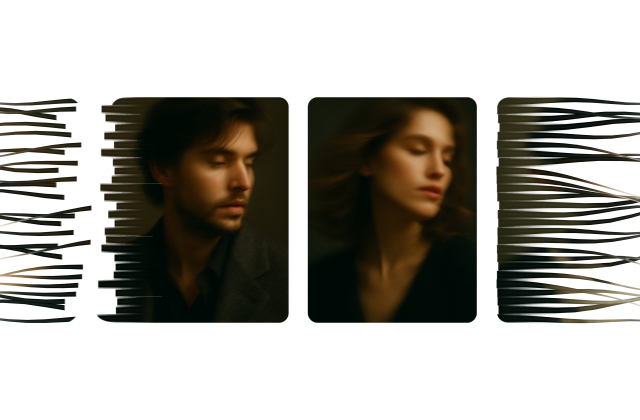
갤러리 안에서는 화면을 벗어나거나 움직임을 멈추면 예제도 닫힙니다. 다시 재생할 때는 처음부터 시작해요.
SOURCE FILES
원본 코드 읽기
수집한 원본 소스와 실행 안내를 함께 제공합니다.
index.html
<!DOCTYPE html>
<html lang="en">
<head>
<meta charset="UTF-8" />
<meta name="viewport" content="width=device-width, initial-scale=1.0" />
<title>Unwoven — an infinite loom of images</title>
<style>
  *{ margin: 0; padding: 0; box-sizing: border-box }
  html, body { height: 100% }
  body { background: #fff; overflow: hidden }

  .stage { position: relative; width: 100%; height: 100%; cursor: grab; touch-action: none }
  .stage.is-dragging { cursor: grabbing }
  .stage canvas { display: block; width: 100%; height: 100% }

  /* Marquee used when WebGL is unavailable. */
  .marquee { position: absolute; inset: 0; display: flex; align-items: center; overflow: hidden }
  .marquee__track { display: flex; gap: 32px; align-items: center; animation: marquee 40s linear infinite; will-change: transform }
  .marquee__track img { width: 300px; height: 400px; object-fit: cover; border-radius: 18px; flex: none }
  @keyframes marquee { from { transform: translateX(0) } to { transform: translateX(-50%) } }
  @media (prefers-reduced-motion: reduce) { .marquee__track { animation: none } }
</style>
</head>
<body>

  <main class="stage" id="stage" aria-hidden="true"></main>

<script src="https://cdnjs.cloudflare.com/ajax/libs/three.js/r128/three.min.js"></script>
<script src="https://cdnjs.cloudflare.com/ajax/libs/gsap/3.12.5/gsap.min.js"></script>
<script>
/**
 * UNWOVEN
 * =======
 * An endless horizontal strip of image cards. Each card is not a quad — it is a
 * stack of horizontal ribbons ("threads"). In the middle of the screen the
 * threads sit flush against each other and the card reads as a solid picture.
 * As a card approaches either edge of the viewport, the threads slide out of
 * frame at different speeds, splay apart, flutter, and dissolve into the page.
 *
 * Read left-to-right: cards enter from the right already unravelled and weave
 * themselves together; cards leaving on the left come apart again.
 */
(function () {
  "use strict";

  /* ================================================================== *
   * 1. Configuration
   * ================================================================== */

  const CONFIG = {
    threads: 26,          // ribbons per card
    segments: 20,         // horizontal subdivisions per ribbon (for the flutter)
    cardMaxHeight: 452,   // px, clamped against viewport height
    cardAspect: 0.75,     // width / height
    cardGapRatio: 0.11,   // gap as a fraction of card width
    cardRadius: 20,       // px corner radius
    scrollSpeed: 95,      // px per second at rest
    flingMax: 4200,       // px per second cap after a drag
    tearZoneRatio: 0.26,  // how far in from an edge the unravelling starts
    tearZoneMax: 380,     // px cap for the above
  };

  /**
   * Swap these for your own images. Any that fail to load keep their
   * generated placeholder, so the demo never shows an empty slot.
   */
  const IMAGE_URLS = [
    "./img/motion_blur_portrait_01.jpg",
    "./img/motion_blur_portrait_02.jpg",
    "./img/motion_blur_portrait_03.jpg",
    "./img/motion_blur_portrait_04.jpg",
    "./img/motion_blur_portrait_05.jpg",
    "./img/motion_blur_portrait_06.jpg",
  ];

  const stage = document.getElementById("stage");
  const reduceMotion = window.matchMedia("(prefers-reduced-motion: reduce)").matches;

  /* ================================================================== *
   * 2. Placeholder artwork
   *    Drawn to a canvas so the demo is self-contained and has something
   *    to show while (or instead of) real photographs load.
   * ================================================================== */

  const PALETTES = [
    { base: ["#f6d5c3", "#e7a48b"], blobs: ["#f2b8a0", "#b86b4b", "#ffe9d9"], accent: "#5a2e1c" },
    { base: ["#dfeeea", "#a9cfc3"], blobs: ["#7fb3a2", "#3f7263", "#eefaf4"], accent: "#1e4034" },
    { base: ["#dfe7f5", "#9fb4d8"], blobs: ["#7d97c6", "#3a5387", "#f0f4ff"], accent: "#1c2a4d" },
    { base: ["#f7e6ee", "#e3a9c6"], blobs: ["#d886b0", "#8f3a68", "#ffeef6"], accent: "#54173c" },
    { base: ["#f5eedd", "#e3ce9d"], blobs: ["#d9b96f", "#8f7331", "#fff8e6"], accent: "#4d3a12" },
    { base: ["#e4e4ec", "#b3b3c6"], blobs: ["#9494ad", "#4c4c66", "#f4f4fa"], accent: "#22222f" },
    { base: ["#dff2f6", "#9ed4e0"], blobs: ["#6db8c9", "#2b6d80", "#effbff"], accent: "#123540" },
    { base: ["#fbe3d6", "#f0ac86"], blobs: ["#e58a5a", "#a34c22", "#fff1e6"], accent: "#521f06" },
    { base: ["#e9f0df", "#c2d3a4"], blobs: ["#a3bd7c", "#5d7a3a", "#f5fae9"], accent: "#2a3d14" },
    { base: ["#efe3f7", "#c6a9e0"], blobs: ["#aa85cc", "#5e3b85", "#f8f0ff"], accent: "#2c1547" },
  ];

  function drawPlaceholder(palette, seed) {
    const w = 640, h = 832;
    const canvas = document.createElement("canvas");
    canvas.width = w;
    canvas.height = h;
    const ctx = canvas.getContext("2d");

    // Tiny deterministic PRNG so a given seed always draws the same plate.
    let s = seed * 9301 + 49297;
    const rnd = () => { s = (s * 9301 + 49297) % 233280; return s / 233280; };

    const gradient = ctx.createLinearGradient(0, 0, 0, h);
    gradient.addColorStop(0, palette.base[0]);
    gradient.addColorStop(1, palette.base[1]);
    ctx.fillStyle = gradient;
    ctx.fillRect(0, 0, w, h);

    ctx.globalCompositeOperation = "lighter";
    for (let i = 0; i < 5; i++) {
      const color = palette.blobs[i % palette.blobs.length];
      const cx = rnd() * w;
      const cy = rnd() * h;
      const r = (0.35 + rnd() * 0.55) * w;
      const blob = ctx.createRadialGradient(cx, cy, 0, cx, cy, r);
      blob.addColorStop(0, color + "cc");
      blob.addColorStop(1, color + "00");
      ctx.fillStyle = blob;
      ctx.fillRect(0, 0, w, h);
    }
    ctx.globalCompositeOperation = "source-over";

    ctx.fillStyle = palette.accent + "22";
    ctx.beginPath();
    ctx.arc(w * (0.3 + rnd() * 0.4), h * (0.25 + rnd() * 0.5), w * (0.10 + rnd() * 0.12), 0, Math.PI * 2);
    ctx.fill();

    // A little grain, so the threads have something to bite on.
    const frame = ctx.getImageData(0, 0, w, h);
    const px = frame.data;
    for (let i = 0; i < px.length; i += 4) {
      const n = (rnd() - 0.5) * 14;
      px[i] += n;
      px[i + 1] += n;
      px[i + 2] += n;
    }
    ctx.putImageData(frame, 0, 0);

    return canvas;
  }

  const SLOT_COUNT = IMAGE_URLS.length || PALETTES.length;
  const placeholders = Array.from({ length: SLOT_COUNT }, (_, i) =>
    drawPlaceholder(PALETTES[i % PALETTES.length], i + 7)
  );

  /* ================================================================== *
   * 3. Bail out early if WebGL or GSAP is missing
   * ================================================================== */

  let renderer = null;
  if (window.THREE && window.gsap) {
    try {
      renderer = new THREE.WebGLRenderer({ antialias: true, alpha: true });
    } catch (err) {
      renderer = null;
    }
  }
  if (!renderer) {
    startMarquee();
    return;
  }

  renderer.setPixelRatio(Math.min(window.devicePixelRatio || 1, 2));
  stage.appendChild(renderer.domElement);

  const scene = new THREE.Scene();
  // Orthographic camera sized in CSS pixels: 1 world unit === 1 pixel.
  const camera = new THREE.OrthographicCamera(-1, 1, 1, -1, -100, 100);

  /* ================================================================== *
   * 4. Shaders
   * ================================================================== */

  const VERTEX_SHADER = /* glsl */ `
    attribute float aThread;   // ribbon index, 0 .. threads-1
    attribute float aRim;      // -1 at the ribbon's top edge, +1 at the bottom

    uniform float uTime;
    uniform float uHalfWidth;  // half the viewport width, in pixels
    uniform float uZone;       // depth of the tear zone at each edge, in pixels
    uniform float uStrength;   // global 0..1 master switch, tweened on load
    uniform float uWobble;     // 0 when the user prefers reduced motion
    uniform float uSeed;       // per-card, so two cards never unravel alike

    varying vec2  vUv;
    varying float vTear;       // 0 = woven, 1 = fully unravelled
    varying float vRim;
    varying float vRandom;     // this ribbon's random value, for the fragment stage

    float hash(float n) {
      return fract(sin(n * 127.1 + 311.7) * 43758.5453);
    }

    void main() {
      vUv = uv;
      vRim = aRim;

      vec4 world = modelMatrix * vec4(position, 1.0);
      float x = world.x;

      // How far into a tear zone is this vertex? Note both smoothsteps are
      // written low-edge-first; GLSL leaves edge0 >= edge1 undefined.
      float left  = 1.0 - smoothstep(-uHalfWidth, -uHalfWidth + uZone, x);
      float right = smoothstep(uHalfWidth - uZone, uHalfWidth, x);
      float tear  = max(left, right) * uStrength;

      // Zones never overlap the centre, so the sign of x is the escape direction.
      float direction = x < 0.0 ? -1.0 : 1.0;

      float randomA = hash(aThread + uSeed * 57.0);
      float randomB = hash(aThread * 3.7 + uSeed * 91.0);
      vRandom = randomA;

      // Bias the ramp so the card stays readable for longer, then lets go fast.
      float t = pow(tear, 1.4);

      // Each ribbon escapes at its own speed, which is what makes the edge
      // read as a comb of threads rather than one sliding sheet.
      float run = t * (60.0 + randomA * 420.0);
      run *= 0.85 + 0.15 * sin(uTime * (1.0 + randomB * 2.0) + randomA * 6.2831);
      world.x += direction * run;

      // The weave loosens vertically too, so ribbons drift out of their rows.
      world.y += (randomA - 0.5) * 170.0 * t * t;

      // Loose-thread flutter, sampled along the ribbon's displaced length.
      world.y += sin(world.x * 0.02 + uTime * (1.6 + randomA * 2.2) + randomA * 6.2831)
                 * (5.0 + 13.0 * randomA) * t * uWobble;

      vTear = tear;
      gl_Position = projectionMatrix * viewMatrix * world;
    }
  `;

  const FRAGMENT_SHADER = /* glsl */ `
    precision highp float;

    uniform sampler2D uMap;
    uniform vec2  uCardSize;    // px
    uniform float uRadius;      // px
    uniform float uImageAspect; // width / height of the texture

    varying vec2  vUv;
    varying float vTear;
    varying float vRim;
    varying float vRandom;

    float sdRoundBox(vec2 p, vec2 b, float r) {
      vec2 q = abs(p) - b + r;
      return length(max(q, 0.0)) + min(max(q.x, q.y), 0.0) - r;
    }

    void main() {
      float tear = vTear;
      float rim  = abs(vRim); // 0 at the ribbon's core, 1 at its edge

      // --- Open the weave -------------------------------------------------
      // The ribbon geometry stays a fixed height; we shrink the *visible*
      // band inside it. Doing this in the fragment stage keeps the edges
      // antialiased and lets the card be perfectly gapless when woven.
      float coreWidth = mix(0.8, 0.16 + vRandom * 0.12, smoothstep(0.0, 0.85, tear));
      float threadAlpha = 1.0 - smoothstep(coreWidth - 0.10, coreWidth + 0.06, rim);
      threadAlpha = mix(1.0, threadAlpha, smoothstep(0.03, 0.30, tear));

      // --- Card silhouette ------------------------------------------------
      vec2 p = (vUv - 0.5) * uCardSize;
      float cardAlpha = 1.0 - smoothstep(-1.5, 0.5, sdRoundBox(p, uCardSize * 0.5, uRadius));

      float fade  = 1.0 - smoothstep(0.75, 1.0, tear) * 0.65;
      float alpha = cardAlpha * threadAlpha * fade;
      if (alpha < 0.003) discard;

      // --- Sample the image, cover-fitted to the card ----------------------
      float cardAspect = uCardSize.x / uCardSize.y;
      vec2 scale = cardAspect > uImageAspect
        ? vec2(1.0, uImageAspect / cardAspect)
        : vec2(cardAspect / uImageAspect, 1.0);
      vec3 color = texture2D(uMap, (vUv - 0.5) * scale + 0.5).rgb;

      // --- Give each ribbon a round, physical read --------------------------
      color *= 1.0 - tear * 0.4 * rim * rim;                          // shade the sides
      color += tear * 0.18 * (1.0 - smoothstep(0.0, 0.45, rim));      // glint on the core
      color = mix(color, vec3(1.0), smoothstep(0.55, 1.0, tear) * 0.8); // bleach into the page

      gl_FragColor = vec4(color, alpha);
    }
  `;

  /* ================================================================== *
   * 5. Ribbon geometry
   *    One BufferGeometry shared by every card. Each ribbon owns its own
   *    vertices, so no ribbon can drag its neighbour along with it.
   * ================================================================== */

  function buildRibbonGeometry(width, height, threads, segments) {
    const columns = segments + 1;
    const perThread = columns * 2;
    const total = threads * perThread;

    const positions = new Float32Array(total * 3);
    const uvs = new Float32Array(total * 2);
    const rims = new Float32Array(total);
    const threadIds = new Float32Array(total);
    const indices = [];

    let v = 0;
    for (let t = 0; t < threads; t++) {
      for (let row = 0; row < 2; row++) {
        const vy = (t + row) / threads; // 0 at the bottom of the card, 1 at the top
        for (let c = 0; c < columns; c++) {
          const ux = c / segments;
          positions[v * 3 + 0] = (ux - 0.5) * width;
          positions[v * 3 + 1] = (vy - 0.5) * height;
          positions[v * 3 + 2] = 0;
          uvs[v * 2 + 0] = ux;
          uvs[v * 2 + 1] = vy;
          rims[v] = row === 0 ? -1 : 1;
          threadIds[v] = t;
          v++;
        }
      }

      const base = t * perThread;
      for (let c = 0; c < segments; c++) {
        const bl = base + c;
        const br = base + c + 1;
        const tl = base + columns + c;
        const tr = base + columns + c + 1;
        indices.push(bl, br, tl, br, tr, tl);
      }
    }

    const geometry = new THREE.BufferGeometry();
    geometry.setAttribute("position", new THREE.BufferAttribute(positions, 3));
    geometry.setAttribute("uv", new THREE.BufferAttribute(uvs, 2));
    geometry.setAttribute("aRim", new THREE.BufferAttribute(rims, 1));
    geometry.setAttribute("aThread", new THREE.BufferAttribute(threadIds, 1));
    geometry.setIndex(indices);
    return geometry;
  }

  /* ================================================================== *
   * 6. Textures and materials — one per image slot, shared by all cards
   *    that show that image.
   * ================================================================== */

  // Uniform objects deliberately shared by reference across every material,
  // so the render loop only ever writes to one of each.
  const shared = {
    uTime:      { value: 0 },
    uHalfWidth: { value: 1 },
    uZone:      { value: 1 },
    uStrength:  { value: 0 },
    uWobble:    { value: reduceMotion ? 0 : 1 },
    uCardSize:  { value: new THREE.Vector2(1, 1) },
    uRadius:    { value: CONFIG.cardRadius },
  };

  function createTexture(source) {
    const texture = new THREE.Texture(source);
    texture.minFilter = THREE.LinearFilter;
    texture.magFilter = THREE.LinearFilter;
    texture.wrapS = texture.wrapT = THREE.ClampToEdgeWrapping;
    texture.generateMipmaps = false;
    texture.needsUpdate = true;
    return texture;
  }

  const slots = placeholders.map((canvas, i) => {
    const texture = createTexture(canvas);
    const material = new THREE.ShaderMaterial({
      vertexShader: VERTEX_SHADER,
      fragmentShader: FRAGMENT_SHADER,
      transparent: true,
      depthTest: false,
      depthWrite: false,
      uniforms: {
        uMap: { value: texture },
        uSeed: { value: (i + 1) * 0.731 },
        uImageAspect: { value: canvas.width / canvas.height },
        uTime: shared.uTime,
        uHalfWidth: shared.uHalfWidth,
        uZone: shared.uZone,
        uStrength: shared.uStrength,
        uWobble: shared.uWobble,
        uCardSize: shared.uCardSize,
        uRadius: shared.uRadius,
      },
    });
    return { texture, material };
  });

  IMAGE_URLS.forEach((url, i) => {
    if (i >= slots.length) return;
    const image = new Image();
    image.crossOrigin = "anonymous";
    image.onload = () => {
      const slot = slots[i];
      slot.texture.image = image;
      slot.texture.needsUpdate = true;
      slot.material.uniforms.uImageAspect.value = image.naturalWidth / image.naturalHeight;
    };
    image.src = url;
  });

  /* ================================================================== *
   * 7. The strip
   * ================================================================== */

  const cards = [];          // { mesh, baseX }
  let geometry = null;
  let cardWidth = 0, cardHeight = 0, pitch = 0, stripSpan = 0;
  let viewportWidth = 0, viewportHeight = 0;

  function rebuildStrip() {
    cards.forEach(card => scene.remove(card.mesh));
    cards.length = 0;
    if (geometry) geometry.dispose();

    geometry = buildRibbonGeometry(cardWidth, cardHeight, CONFIG.threads, CONFIG.segments);

    // Enough cards to cover the viewport plus a card's worth of slack at each
    // end, so nothing ever pops into view mid-screen.
    const count = Math.max(8, Math.ceil((viewportWidth + pitch * 3) / pitch));
    stripSpan = count * pitch;

    for (let i = 0; i < count; i++) {
      const mesh = new THREE.Mesh(geometry, slots[i % slots.length].material);
      mesh.frustumCulled = false; // vertices leave the plane's bounding box
      scene.add(mesh);
      cards.push({ mesh, baseX: i * pitch });
    }
  }

  function resize() {
    viewportWidth = stage.clientWidth;
    viewportHeight = stage.clientHeight;

    renderer.setSize(viewportWidth, viewportHeight);
    camera.left = -viewportWidth / 2;
    camera.right = viewportWidth / 2;
    camera.top = viewportHeight / 2;
    camera.bottom = -viewportHeight / 2;
    camera.updateProjectionMatrix();

    cardHeight = Math.min(CONFIG.cardMaxHeight, viewportHeight * 0.62);
    cardWidth = cardHeight * CONFIG.cardAspect;
    pitch = cardWidth + Math.max(24, cardWidth * CONFIG.cardGapRatio);

    shared.uHalfWidth.value = viewportWidth / 2;
    shared.uZone.value = Math.min(viewportWidth * CONFIG.tearZoneRatio, CONFIG.tearZoneMax);
    shared.uCardSize.value.set(cardWidth, cardHeight);

    rebuildStrip();
  }

  /* ================================================================== *
   * 8. Motion: autoplay, drag, fling
   * ================================================================== */

  const baseSpeed = reduceMotion ? 0 : CONFIG.scrollSpeed;
  const motion = { velocity: 0 };
  let offset = 0;

  gsap.to(motion, { velocity: baseSpeed, duration: 2.4, ease: "power2.out", delay: 0.35 });
  gsap.to(shared.uStrength, { value: 1, duration: 1.8, ease: "power3.inOut", delay: 0.2 });

  let dragging = false;
  let lastX = 0, lastTime = 0, dragVelocity = 0;

  stage.addEventListener("pointerdown", (event) => {
    dragging = true;
    lastX = event.clientX;
    lastTime = performance.now();
    dragVelocity = 0;
    stage.classList.add("is-dragging");
    stage.setPointerCapture(event.pointerId);
    gsap.killTweensOf(motion);
  });

  stage.addEventListener("pointermove", (event) => {
    if (!dragging) return;
    const now = performance.now();
    const dx = event.clientX - lastX;
    const dt = Math.max(1, now - lastTime) / 1000;
    offset -= dx;
    // Smoothed, so pausing before release doesn't fling at the old speed.
    dragVelocity += (-dx / dt - dragVelocity) * 0.35;
    lastX = event.clientX;
    lastTime = now;
  });

  function endDrag() {
    if (!dragging) return;
    dragging = false;
    stage.classList.remove("is-dragging");
    motion.velocity = gsap.utils.clamp(-CONFIG.flingMax, CONFIG.flingMax, dragVelocity);
    gsap.to(motion, { velocity: baseSpeed, duration: 2.2, ease: "power3.out" });
  }

  stage.addEventListener("pointerup", endDrag);
  stage.addEventListener("pointercancel", endDrag);
  stage.addEventListener("lostpointercapture", endDrag);

  /* ================================================================== *
   * 9. Frame loop
   * ================================================================== */

  gsap.ticker.add((time, deltaMS) => {
    if (!dragging) offset += motion.velocity * (deltaMS / 1000);
    shared.uTime.value = time;

    const half = stripSpan / 2;
    for (const card of cards) {
      const x = ((card.baseX - offset) % stripSpan + stripSpan) % stripSpan;
      card.mesh.position.x = x - half;
    }

    renderer.render(scene, camera);
  });

  window.addEventListener("resize", resize);
  resize();

  /* ================================================================== *
   * 10. CSS-only fallback
   * ================================================================== */

  function startMarquee() {
    const wrap = document.createElement("div");
    wrap.className = "marquee";
    const track = document.createElement("div");
    track.className = "marquee__track";

    // Duplicated so the -50% keyframe loops seamlessly.
    [...placeholders, ...placeholders].forEach((canvas) => {
      const img = document.createElement("img");
      img.src = canvas.toDataURL("image/jpeg", 0.85);
      img.alt = "";
      track.appendChild(img);
    });

    wrap.appendChild(track);
    stage.appendChild(wrap);
    stage.style.cursor = "default";
  }
})();
</script>
</body>
</html>
Media credits and license evidence실행 안내·자료
README.md
## Credits

Built with [three.js](https://threejs.org/) and [GSAP](https://gsap.com/).

Created by [Clément Grellier](https://clementgrellier.fr/)


## License

[MIT](LICENSE.md)
함께 쓰는 파일 2개 보기
LICENSE.md실행 안내·자료
MIT License

Copyright (c) 2009 - 2026 [Clément Grellier](https://clementgrellier.fr/)

Permission is hereby granted, free of charge, to any person obtaining a copy
of this software and associated documentation files (the "Software"), to deal
in the Software without restriction, including without limitation the rights
to use, copy, modify, merge, publish, distribute, sublicense, and/or sell
copies of the Software, and to permit persons to whom the Software is
furnished to do so, subject to the following conditions:

The above copyright notice and this permission notice shall be included in all
copies or substantial portions of the Software.

THE SOFTWARE IS PROVIDED "AS IS", WITHOUT WARRANTY OF ANY KIND, EXPRESS OR
IMPLIED, INCLUDING BUT NOT LIMITED TO THE WARRANTIES OF MERCHANTABILITY,
FITNESS FOR A PARTICULAR PURPOSE AND NONINFRINGEMENT. IN NO EVENT SHALL THE
AUTHORS OR COPYRIGHT HOLDERS BE LIABLE FOR ANY CLAIM, DAMAGES OR OTHER
LIABILITY, WHETHER IN AN ACTION OF CONTRACT, TORT OR OTHERWISE, ARISING FROM,
OUT OF OR IN CONNECTION WITH THE SOFTWARE OR THE USE OR OTHER DEALINGS IN THE
SOFTWARE.
Bundled dependency licenses실행 안내·자료
https://cdn.jsdelivr.net/npm/three@0.128.0/LICENSE
The MIT License

Copyright © 2010-2021 three.js authors

Permission is hereby granted, free of charge, to any person obtaining a copy
of this software and associated documentation files (the "Software"), to deal
in the Software without restriction, including without limitation the rights
to use, copy, modify, merge, publish, distribute, sublicense, and/or sell
copies of the Software, and to permit persons to whom the Software is
furnished to do so, subject to the following conditions:

The above copyright notice and this permission notice shall be included in
all copies or substantial portions of the Software.

THE SOFTWARE IS PROVIDED "AS IS", WITHOUT WARRANTY OF ANY KIND, EXPRESS OR
IMPLIED, INCLUDING BUT NOT LIMITED TO THE WARRANTIES OF MERCHANTABILITY,
FITNESS FOR A PARTICULAR PURPOSE AND NONINFRINGEMENT. IN NO EVENT SHALL THE
AUTHORS OR COPYRIGHT HOLDERS BE LIABLE FOR ANY CLAIM, DAMAGES OR OTHER
LIABILITY, WHETHER IN AN ACTION OF CONTRACT, TORT OR OTHERWISE, ARISING FROM,
OUT OF OR IN CONNECTION WITH THE SOFTWARE OR THE USE OR OTHER DEALINGS IN
THE SOFTWARE.


GSAP standard license snapshot
Source: https://gsap.com/community/standard-license/
Retrieved: 2026-09-22T04:22:49.089Z
Original distribution copyright and version headers remain in the runtime code.

Standard "No Charge" GSAP License

 I. DEFINITIONS

 “GSAP License” means the terms and conditions of this GSAP Software License Agreement.

 "GSAP Products" means any Software made available at gsap.com (https://gsap.com) or any successor sites, including but not limited to the GSAP animation library and related plugins, tools, or extensions.

 "Permitted Uses" means the implementation and/or use of GSAP Products on any website, web application, or digital interface by any person or entity (which may include, for clarity, those of companies that compete with Webflow in other areas of business).

 "Prohibited Uses" means any implementation and/or use of GSAP Products in tools that allow users to build visual animations without code that encourages, induces, or materially assists in creating a solution that competes with Webflow’s visual animation building capabilities.

 "Competitive Products" means any software, tool, or service that enables users to create, edit, or manage animations through a visual interface or builder similar to Webflow (https://webflow.com).

 II. GRANT OF LICENSE

 Subject to the terms and conditions of this GSAP License, Webflow grants you a non-exclusive, worldwide license to use, reproduce, display, and implement GSAP Products solely for Permitted Uses.

 III. RESTRICTIONS

 You may not:

 Use any GSAP Products for any Prohibited Uses without prior written consent;

 Reverse engineer any GSAP Products for the purpose of creating Competitive Products;

 Remove or alter any proprietary notices or branding from GSAP Products.

 IV. OWNERSHIP AND INTELLECTUAL PROPERTY

 All intellectual property rights in GSAP Products, including but not limited to copyright, patents, trademarks, and trade secrets, remain the exclusive property of Webflow. This GSAP License does not transfer any ownership rights in GSAP Products to you.

 V. TERMINATION

 Webflow may terminate this GSAP License and revoke your access in its discretion if you fail to comply with any of these terms and conditions. Upon termination, you must cease all use of GSAP Products and destroy all copies in your possession.

 VI. MISCELLANEOUS PROVISIONS

 General: This GSAP License is incorporated into and subject to Webflow’s Terms of Service available here (https://webflow.com/legal/terms) ("Terms of Service"). In the event of any conflict or inconsistency between this GSAP License and the Terms of Service, the terms of this GSAP License shall govern in relation to your use of any GSAP Products.

 Amendments: Webflow reserves the right to update or modify this GSAP License at any time by posting the revised terms on this website, provided that any such updates or modifications shall not result in any material degradation to the security, integrity, or functionality of any GSAP Products. You understand and agree that your continued use of any GSAP Products after such revisions to this GSAP License constitutes your acceptance of this GSAP License as revised. If you do not accept the revised GSAP License, you are prohibited from using versions of the GSAP Products released after the effective date of the revised GSAP License (as well as any updates made to previous versions). Notwithstanding, you may continue using previous versions of GSAP Products under the applicable terms licensed to you prior to the effective date of the revised GSAP License (for clarity, excluding any updates made thereto).

 No Waiver: Failure of Webflow to enforce any provision of this GSAP License shall not constitute a waiver of future enforcement of that or any other provision.

 FAQ

 Is it acceptable for AI tools like ChatGPT, Cursor, Lovable, Webstudio, etc. to generate GSAP code?
 Absolutely! AI-generated code is not a "Prohibited Use".

 What if a WordPress plugin or theme or other niche tool allows users to create GSAP-driven effects through a visual interface? Is that prohibited?
 We want to encourage developers to build on top of GSAP, including visual tools that don't directly compete with Webflow's rich animation-building capabilities. If you are not sure if your product might be considered a "Prohibited Use", feel free to contact us (https://gsap.com/contact) so we can talk through it!

 Can I really use GSAP in commercial projects without paying anything?
 Yes, really! Commercial usage is covered under the standard license. All of GSAP including the plugins that were formerly "members-only" like SplitText (https://gsap.com/docs/v3/Plugins/SplitText/) and MorphSVG (https://gsap.com/docs/v3/Plugins/MorphSVGPlugin) can be used in commercial projects at no charge. Enjoy! 💚

 Effective date: April 30, 2025

 Last modified date: May 30, 2025

 Copyright (©) 2025, Webflow
BEHIND THE EXAMPLE
이 장면을 만드는 원리
화면 가장자리에서만 풀리는 리본
효과를 멈추거나 제거해도 같은 정보와 행동에 도달할 수 있어야 합니다.
- 이 예제에서는
- VERTEX_SHADER는 세계 x좌표와 화면 양 끝의 구간으로 tear를 만들고 리본 인덱스별 난수로 흩어짐을 달리합니다. uWobble은 시간에 따른 추가 흔들림과 관련된 별도 제어입니다.
코드와 함께 확인하기
코드에서 찾기
VERTEX_SHADERindex.htmlleft·right smoothstep의 최댓값으로 가장자리의 해체 정도를 만듭니다.
직접 해보기
감소 선호를 켠 상태와 일반 상태에서 가장자리 이동을 비교합니다.
살펴볼 변화시간 흔들림 감소와 카드의 자동 이동·해체가 각각 어떻게 처리되는지 확인해야 합니다.