Codrops 원본
Building Responsive, Scroll-Triggered Curved Path Animations with GSAP
스크롤 · MIT
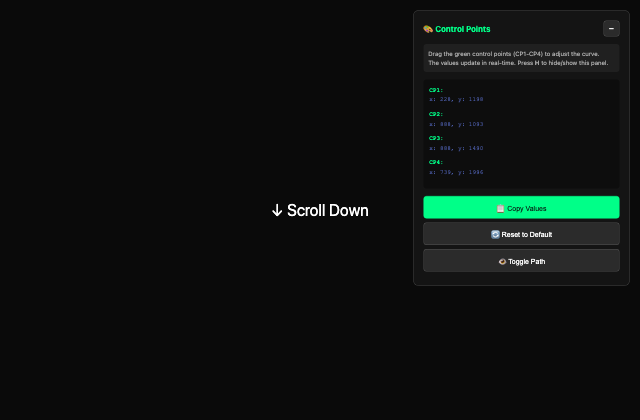
갤러리 안에서는 화면을 벗어나거나 움직임을 멈추면 예제도 닫힙니다. 다시 재생할 때는 처음부터 시작해요.
SOURCE FILES
원본 코드 읽기
수집한 원본 소스와 실행 안내를 함께 제공합니다.
JoGZQLZ/index.html
                    <!DOCTYPE html>
    <html lang="en">
      <head>
        <meta charset="UTF-8">
        <meta name="viewport" content="width=device-width, initial-scale=1.0">
        <title>Interactive Curved Path - Drag Control Points</title>

      </head>
      <body>
        <div class="spacer">
          <p>↓ Scroll Down</p>
        </div>
        <div class="hero-section" data-section="hero">
          <div class="position pos1" data-pos="1">Position 1</div>
          <div class="position pos2" data-pos="2">Position 2</div>
          <div class="position pos3" data-pos="3">Position 3</div>
          <div class="animated-image" data-image="animated"></div>
        </div>

        <div class="spacer">
          <p>↑ Scroll Back</p>
        </div>
        <div class="control-panel" id="controlPanel">
          <div class="panel-header">
            <h3>🎨 Control Points<span class="minimized-hint">(Click + to expand)</span></h3>
            <button class="toggle-btn" onclick="togglePanel()" id="toggleBtn">−</button>
          </div>
          <div class="panel-content">
            <div class="instructions">
              Drag the green control points (CP1-CP4) to adjust the curve.<br> The values update in real-time. Press <strong>H</strong> to hide/show this panel.
            </div>
            <div class="control-point-values" id="values">
              <!-- Values will be inserted here -->
            </div>
            <button class="button primary" onclick="copyValues()">📋 Copy Values</button>
            <button class="button" onclick="resetToDefault()">🔄 Reset to Default</button>
            <button class="button" onclick="togglePath()">👁️ Toggle Path</button>
          </div>
        </div>

        <div class="toast" id="toast">Copied to clipboard!</div>

        <!-- GSAP and Plugins -->
        <script src="https://cdnjs.cloudflare.com/ajax/libs/gsap/3.12.2/gsap.min.js"></script>
        <script src="https://cdnjs.cloudflare.com/ajax/libs/gsap/3.12.2/ScrollTrigger.min.js"></script>
        <script src="https://cdnjs.cloudflare.com/ajax/libs/gsap/3.12.2/MotionPathPlugin.min.js"></script>

      </body>
    </html>
JoGZQLZ/script.js
                    gsap.registerPlugin(ScrollTrigger, MotionPathPlugin);

    let currentControlPoints = null;
    let positions = null;
    let draggingPoint = null;
    let pathVisible = true;

    function initInteractivePath() {
      const section = document.querySelector('[data-section="hero"]');
      const pos1 = document.querySelector('[data-pos="1"]');
      const pos2 = document.querySelector('[data-pos="2"]');
      const pos3 = document.querySelector('[data-pos="3"]');
      const img = document.querySelector('[data-image="animated"]');

      if (!section || !pos1 || !pos2 || !pos3 || !img) {
        console.error('Missing required elements');
        return;
      }

      // Setup
      if (getComputedStyle(section).position === 'static') {
        section.style.position = 'relative';
      }

      if (img.parentNode !== section) {
        img.parentNode.removeChild(img);
        section.appendChild(img);
      }

      img.style.position = 'absolute';
      img.style.zIndex = '10';
      img.style.background = 'linear-gradient(135deg, #667eea 0%, #764ba2 100%)';
      gsap.set(img, { transformOrigin: '50% 50%', xPercent: -50, yPercent: -50 });
      // Create debug SVG
      let debugSvg = document.createElementNS('http://www.w3.org/2000/svg', 'svg');
      debugSvg.style.position = 'absolute';
      debugSvg.style.top = 0;
      debugSvg.style.left = 0;
      debugSvg.style.width = '100%';
      debugSvg.style.height = '100%';
      debugSvg.style.pointerEvents = 'none';
      debugSvg.style.zIndex = 15; // Above the image (which is z-index 10)
      section.appendChild(debugSvg);
      let debugPath = document.createElementNS('http://www.w3.org/2000/svg', 'path');
      debugPath.setAttribute('stroke', '#ff0040');
      debugPath.setAttribute('stroke-width', '3');
      debugPath.setAttribute('fill', 'none');
      debugPath.setAttribute('opacity', '0.8');
      debugSvg.appendChild(debugPath);

      const controlPointElements = [];
      const handleLines = [];
      const anchorPoints = [];

      // Create anchor point markers
      for (let i = 0; i < 3; i++) {
        const circle = document.createElementNS('http://www.w3.org/2000/svg', 'circle');
        circle.setAttribute('r', '8');
        circle.setAttribute('fill', '#ff0040');
        circle.setAttribute('stroke', '#ffffff');
        circle.setAttribute('stroke-width', '2');
        circle.setAttribute('opacity', '0.9');
        debugSvg.appendChild(circle);
        anchorPoints.push(circle);

        const text = document.createElementNS('http://www.w3.org/2000/svg', 'text');
        text.setAttribute('fill', '#ff0040');
        text.setAttribute('font-size', '12');
        text.setAttribute('font-weight', 'bold');
        text.textContent = `P${i + 1}`;
        debugSvg.appendChild(text);
        anchorPoints.push(text);
      }

      // Create handle lines
      for (let i = 0; i < 4; i++) {
        const line = document.createElementNS('http://www.w3.org/2000/svg', 'line');
        line.setAttribute('stroke', '#00ff88');
        line.setAttribute('stroke-width', '1');
        line.setAttribute('stroke-dasharray', '4,4');
        line.setAttribute('opacity', '0.5');
        debugSvg.appendChild(line);
        handleLines.push(line);
      }

      // Create draggable control points
      for (let i = 0; i < 4; i++) {
        const circle = document.createElementNS('http://www.w3.org/2000/svg', 'circle');
        circle.setAttribute('r', '8');
        circle.setAttribute('fill', '#00ff88');
        circle.setAttribute('stroke', '#ffffff');
        circle.setAttribute('stroke-width', '2');
        circle.setAttribute('opacity', '0.9');
        circle.setAttribute('class', 'svg-control-point');
        circle.style.pointerEvents = 'all';
        circle.dataset.index = i;
        debugSvg.appendChild(circle);
        controlPointElements.push(circle);

        const text = document.createElementNS('http://www.w3.org/2000/svg', 'text');
        text.setAttribute('fill', '#00ff88');
        text.setAttribute('font-size', '12');
        text.setAttribute('font-weight', 'bold');
        text.textContent = `CP${i + 1}`;
        text.style.pointerEvents = 'none';
        debugSvg.appendChild(text);
        controlPointElements.push(text);
      }

      // Get positions relative to section
      function getPositions() {
        const rectSection = section.getBoundingClientRect();
        return [pos1, pos2, pos3].map((el) => {
          const r = el.getBoundingClientRect();
          return {
            x: r.left - rectSection.left + r.width / 2,
            y: r.top - rectSection.top + r.height / 2,
            width: r.width,
            height: r.height,
          };
        });
      }

      // Calculate default control points
      function calculateDefaultControlPoints(positions) {
        return [
          {
            x: positions[0].x,
            y: positions[0].y + (positions[1].y - positions[0].y) * 0.8,
          },
          {
            x: positions[1].x,
            y: positions[1].y - Math.min(800, (positions[1].y - positions[0].y) * 0.3),
          },
          {
            x: positions[1].x,
            y: positions[1].y + Math.min(80, (positions[2].y - positions[1].y) * 0.3),
          },
          {
            x: positions[1].x + (positions[2].x - positions[1].x) * 0.6,
            y: positions[2].y - (positions[2].y - positions[1].y) * 0.2,
          }
        ];
      }

      let tl;

      function buildAnimation() {
        if (tl) tl.kill();

        positions = getPositions();

        // Initialize control points if not set
        if (!currentControlPoints) {
          currentControlPoints = calculateDefaultControlPoints(positions);
        }

        // Set initial position and size
        gsap.set(img, {
          x: positions[0].x,
          y: positions[0].y,
          width: positions[0].width,
          height: positions[0].height,
        });

        updateVisualization();
        tl = gsap.timeline({
          scrollTrigger: {
            trigger: section,
            start: 'top top',
            end: 'bottom bottom',
            scrub: true,
            invalidateOnRefresh: true,
            onUpdate: (self) => {
              // Rebuild path if needed during scroll
            }
          },
        });

        const pathString = buildPathString();

        // Animate along path
        tl.to(img, {
          duration: 1.5,
          motionPath: {
            path: pathString,
            autoRotate: false,
          },
          ease: 'none',
          onUpdate: function () {
            const progress = this.progress();

            if (progress <= 0.5) {
              const normalizedProgress = progress * 2;
              const width = positions[0].width + (positions[1].width - positions[0].width) * normalizedProgress;
              const height = positions[0].height + (positions[1].height - positions[0].height) * normalizedProgress;
              img.style.width = `${width}px`;
              img.style.height = `${height}px`;
            } else {
              const normalizedProgress = (progress - 0.5) * 2;
              const width = positions[1].width + (positions[2].width - positions[1].width) * normalizedProgress;
              const height = positions[1].height + (positions[2].height - positions[1].height) * normalizedProgress;
              img.style.width = `${width}px`;
              img.style.height = `${height}px`;
            }
          },
        });
      }

      function buildPathString() {
        return `M${positions[0].x},${positions[0].y} ` +
          `C${currentControlPoints[0].x},${currentControlPoints[0].y} ${currentControlPoints[1].x},${currentControlPoints[1].y} ${positions[1].x},${positions[1].y} ` +
          `C${currentControlPoints[2].x},${currentControlPoints[2].y} ${currentControlPoints[3].x},${currentControlPoints[3].y} ${positions[2].x},${positions[2].y}`;
      }
      function updateVisualization() {
        const pathString = buildPathString();
        debugPath.setAttribute('d', pathString);

        // Update anchor points
        positions.forEach((pos, i) => {
          const circle = anchorPoints[i * 2];
          const text = anchorPoints[i * 2 + 1];
          circle.setAttribute('cx', pos.x);
          circle.setAttribute('cy', pos.y);
          text.setAttribute('x', pos.x + 12);
          text.setAttribute('y', pos.y - 12);
        });
        // Update control points
        currentControlPoints.forEach((cp, i) => {
          const circle = controlPointElements[i * 2];
          const text = controlPointElements[i * 2 + 1];
          circle.setAttribute('cx', cp.x);
          circle.setAttribute('cy', cp.y);
          text.setAttribute('x', cp.x + 12);
          text.setAttribute('y', cp.y - 12);
        });

        // Update handle lines
        handleLines[0].setAttribute('x1', positions[0].x);
        handleLines[0].setAttribute('y1', positions[0].y);
        handleLines[0].setAttribute('x2', currentControlPoints[0].x);
        handleLines[0].setAttribute('y2', currentControlPoints[0].y);

        handleLines[1].setAttribute('x1', positions[1].x);
        handleLines[1].setAttribute('y1', positions[1].y);
        handleLines[1].setAttribute('x2', currentControlPoints[1].x);
        handleLines[1].setAttribute('y2', currentControlPoints[1].y);
        handleLines[2].setAttribute('x1', positions[1].x);
        handleLines[2].setAttribute('y1', positions[1].y);
        handleLines[2].setAttribute('x2', currentControlPoints[2].x);
        handleLines[2].setAttribute('y2', currentControlPoints[2].y);

        handleLines[3].setAttribute('x1', positions[2].x);
        handleLines[3].setAttribute('y1', positions[2].y);
        handleLines[3].setAttribute('x2', currentControlPoints[3].x);
        handleLines[3].setAttribute('y2', currentControlPoints[3].y);

        updateValuesDisplay();
      }

      function updateValuesDisplay() {
        const valuesDiv = document.getElementById('values');
        const rectSection = section.getBoundingClientRect();

        let html = '';
        currentControlPoints.forEach((cp, i) => {
          const relativeY = positions[i < 2 ? 0 : (i < 3 ? 1 : 2)].y;
          const relativeX = positions[i < 2 ? 0 : (i < 3 ? 1 : 2)].x;
          html += `<div class="cp-group">`;
          html += `<span class="cp-label">CP${i + 1}:</span><br>`;
          html += `<span class="cp-value">x: ${Math.round(cp.x)}, y: ${Math.round(cp.y)}</span>`;
          html += `</div>`;
        });

        valuesDiv.innerHTML = html;
      }

      // Dragging functionality
      let isDragging = false;
      let currentDragIndex = -1;

      function startDrag(e) {
        const target = e.target;
        if (target.classList.contains('svg-control-point')) {
          isDragging = true;
          currentDragIndex = parseInt(target.dataset.index);
          target.classList.add('dragging');
          e.preventDefault();
        }
      }

      function drag(e) {
        if (!isDragging || currentDragIndex === -1) return;

        const rectSection = section.getBoundingClientRect();
        const clientX = e.clientX || (e.touches && e.touches[0].clientX);
        const clientY = e.clientY || (e.touches && e.touches[0].clientY);

        const newX = clientX - rectSection.left;
        const newY = clientY - rectSection.top;

        currentControlPoints[currentDragIndex] = { x: newX, y: newY };

        updateVisualization();

        // Rebuild animation with new control points
        if (tl) {
          const progress = tl.scrollTrigger.progress;
          tl.kill();
          buildAnimation();
          if (tl.scrollTrigger) {
            tl.scrollTrigger.scroll(tl.scrollTrigger.start + (tl.scrollTrigger.end - tl.scrollTrigger.start) * progress);
          }
        }
      }

      function endDrag(e) {
        if (isDragging) {
          const circles = debugSvg.querySelectorAll('.svg-control-point');
          circles.forEach(c => c.classList.remove('dragging'));
          isDragging = false;
          currentDragIndex = -1;
        }
      }

      // Event listeners for dragging
      debugSvg.addEventListener('mousedown', startDrag);
      document.addEventListener('mousemove', drag);
      document.addEventListener('mouseup', endDrag);

      debugSvg.addEventListener('touchstart', startDrag);
      document.addEventListener('touchmove', drag);
      document.addEventListener('touchend', endDrag);

      buildAnimation();

      // Rebuild on resize
      let resizeTimeout;
      window.addEventListener('resize', () => {
        clearTimeout(resizeTimeout);
        resizeTimeout = setTimeout(() => {
          positions = getPositions();
          updateVisualization();
          buildAnimation();
        }, 200);
      });

      return {
        reset: () => {
          currentControlPoints = calculateDefaultControlPoints(positions);
          updateVisualization();
          buildAnimation();
        },
        togglePath: () => {
          pathVisible = !pathVisible;
          debugSvg.style.display = pathVisible ? 'block' : 'none';
        }
      };
    }

    // Initialize
    const controller = initInteractivePath();

    // Global functions for buttons
    function copyValues() {
      const valuesText = currentControlPoints.map((cp, i) =>
                                                  `const controlPoint${i + 1} = {\n  x: ${Math.round(cp.x)},\n  y: ${Math.round(cp.y)}\n};`
                                                 ).join('\n\n');

      navigator.clipboard.writeText(valuesText).then(() => {
        const toast = document.getElementById('toast');
        toast.classList.add('show');
        setTimeout(() => toast.classList.remove('show'), 2000);
      });
    }

    function resetToDefault() {
      controller.reset();
    }

    function togglePath() {
      controller.togglePath();
    }

    function togglePanel() {
      const panel = document.getElementById('controlPanel');
      const btn = document.getElementById('toggleBtn');

      panel.classList.toggle('minimized');

      if (panel.classList.contains('minimized')) {
        btn.textContent = '+';
      } else {
        btn.textContent = '−';
      }
    }

    // Keyboard shortcut: Press 'H' to hide/show panel
    document.addEventListener('keydown', (e) => {
      if (e.key === 'h' || e.key === 'H') {
        togglePanel();
      }
    });

    // Click anywhere on minimized panel to expand
    document.getElementById('controlPanel').addEventListener('click', (e) => {
      const panel = document.getElementById('controlPanel');
      const btn = document.getElementById('toggleBtn');

      // Only expand if panel is minimized and click wasn't on a button inside
      if (panel.classList.contains('minimized') && e.target !== btn) {
        togglePanel();
      }
    });
함께 쓰는 파일 4개 보기
JoGZQLZ/style.css
                    * {
      margin: 0;
      padding: 0;
      box-sizing: border-box;
    }

    body {
      font-family: -apple-system, BlinkMacSystemFont, 'Segoe UI', sans-serif;
      background: #0a0a0a;
      color: #fff;
      overflow-x: hidden;
    }
    .spacer {
      height: 100vh;
      display: flex;
      align-items: center;
      justify-content: center;
      font-size: 2rem;
    }

    .hero-section {
      position: relative;
      height: 300vh;
      background: linear-gradient(180deg, #1a1a1a 0%, #0a0a0a 100%);
    }

    .position {
      position: absolute;
      border: 2px dashed rgba(255, 255, 255, 0.3);
      border-radius: 12px;
      display: flex;
      align-items: center;
      justify-content: center;
      color: rgba(255, 255, 255, 0.5);
      font-size: 14px;
    }

    .pos1 {
      top: 10%;
      left: 10%;
      width: 200px;
      height: 200px;
    }

    .pos2 {
      top: 50%;
      right: 15%;
      width: 400px;
      height: 300px;
    }

    .pos3 {
      bottom: 10%;
      left: 50%;
      transform: translateX(-50%);
      width: 250px;
      height: 250px;
    }

    .animated-image {
      border-radius: 12px;
      overflow: hidden;
      box-shadow: 0 20px 60px rgba(0, 0, 0, 0.5);
    }

    .control-panel {
      position: fixed;
      top: 20px;
      right: 20px;
      background: rgba(20, 20, 20, 0.95);
      border: 1px solid rgba(255, 255, 255, 0.2);
      border-radius: 12px;
      padding: 20px;
      z-index: 1000;
      backdrop-filter: blur(10px);
      min-width: 300px;
      max-height: 90vh;
      overflow-y: auto;
      transition: all 0.3s ease;
    }

    .control-panel.minimized {
      min-width: auto;
      padding: 12px 16px;
      cursor: pointer;
    }

    .control-panel.minimized:hover {
      background: rgba(30, 30, 30, 0.95);
    }

    .control-panel.minimized .panel-content {
      display: none;
    }

    .panel-header {
      display: flex;
      align-items: center;
      justify-content: space-between;
      margin-bottom: 15px;
      column-gap: 16px;
    }

    .control-panel.minimized .panel-header {
      margin-bottom: 0;
    }

    .panel-header h3 {
      margin: 0;
      font-size: 16px;
      color: #00ff88;
    }

    .control-panel.minimized .panel-header h3 {
      font-size: 14px;
    }

    .minimized-hint {
      display: none;
      color: rgba(255, 255, 255, 0.6);
      font-size: 12px;
      margin-left: 8px;
    }

    .control-panel.minimized .minimized-hint {
      display: inline;
    }

    .toggle-btn {
      background: rgba(255, 255, 255, 0.1);
      border: 1px solid rgba(255, 255, 255, 0.2);
      border-radius: 6px;
      width: 32px;
      height: 32px;
      color: white;
      display: flex;
      align-items: center;
      justify-content: center;
      cursor: pointer;
      transition: all 0.2s;
      font-size: 18px;
      user-select: none;
    }

    .toggle-btn:hover {
      background: rgba(255, 255, 255, 0.15);
      border-color: #00ff88;
      transform: rotate(90deg);
    }

    .toggle-btn:active {
      transform: scale(0.95);
    }

    .control-point-values {
      font-family: 'Courier New', monospace;
      font-size: 12px;
      line-height: 1.6;
      background: rgba(0, 0, 0, 0.3);
      padding: 12px;
      border-radius: 6px;
      margin-bottom: 15px;
    }

    .control-point-values .cp-group {
      margin-bottom: 10px;
    }

    .control-point-values .cp-label {
      color: #00ff88;
      font-weight: bold;
    }

    .control-point-values .cp-value {
      color: #667eea;
    }

    .button {
      width: 100%;
      padding: 10px;
      background: rgba(255, 255, 255, 0.1);
      border: 1px solid rgba(255, 255, 255, 0.2);
      border-radius: 6px;
      color: white;
      cursor: pointer;
      font-size: 14px;
      margin-bottom: 8px;
      transition: all 0.2s;
    }

    .button:hover {
      background: rgba(255, 255, 255, 0.15);
      border-color: #00ff88;
    }

    .button.primary {
      background: #00ff88;
      color: #0a0a0a;
      border-color: #00ff88;
    }

    .button.primary:hover {
      background: #00dd77;
    }

    .instructions {
      font-size: 12px;
      color: rgba(255, 255, 255, 0.6);
      line-height: 1.5;
      margin-bottom: 15px;
      padding: 10px;
      background: rgba(255, 255, 255, 0.05);
      border-radius: 6px;
    }

    .svg-control-point {
      cursor: grab;
      transition: r 0.2s;
    }

    .svg-control-point:hover {
      r: 8;
    }

    .svg-control-point:active {
      cursor: grabbing;
    }

    .svg-control-point.dragging {
      r: 10;
    }

    .toast {
      position: fixed;
      bottom: 30px;
      left: 50%;
      transform: translateX(-50%);
      background: #00ff88;
      color: #0a0a0a;
      padding: 12px 24px;
      border-radius: 8px;
      font-weight: 600;
      opacity: 0;
      transition: opacity 0.3s;
      z-index: 2000;
      pointer-events: none;
    }

    .toast.show {
      opacity: 1;
    }

    @media (max-width: 768px) {
      .control-panel {
        top: 10px;
        right: 10px;
        left: 10px;
        min-width: auto;
      }

      .control-panel.minimized {
        left: auto;
        right: 10px;
      }

      .pos1 {
        width: 120px;
        height: 120px;
      }
      .pos2 {
        width: 250px;
        height: 200px;
      }
      .pos3 {
        width: 150px;
        height: 150px;
      }
    }
Original author attribution실행 안내·자료
Paths & Control Points
Original CodePen author account: betawaxx
Article author: Ross Anderson
Code license: MIT under the verified Codrops downloadable-demo publisher grant.
Preserve the MIT notice and separate dependency/media credits.
Bundled dependency licenses실행 안내·자료
GSAP standard license snapshot
Source: https://gsap.com/community/standard-license/
Retrieved: 2026-09-22T04:22:49.089Z
Original distribution copyright and version headers remain in the runtime code.

Standard "No Charge" GSAP License

 I. DEFINITIONS

 “GSAP License” means the terms and conditions of this GSAP Software License Agreement.

 "GSAP Products" means any Software made available at gsap.com (https://gsap.com) or any successor sites, including but not limited to the GSAP animation library and related plugins, tools, or extensions.

 "Permitted Uses" means the implementation and/or use of GSAP Products on any website, web application, or digital interface by any person or entity (which may include, for clarity, those of companies that compete with Webflow in other areas of business).

 "Prohibited Uses" means any implementation and/or use of GSAP Products in tools that allow users to build visual animations without code that encourages, induces, or materially assists in creating a solution that competes with Webflow’s visual animation building capabilities.

 "Competitive Products" means any software, tool, or service that enables users to create, edit, or manage animations through a visual interface or builder similar to Webflow (https://webflow.com).

 II. GRANT OF LICENSE

 Subject to the terms and conditions of this GSAP License, Webflow grants you a non-exclusive, worldwide license to use, reproduce, display, and implement GSAP Products solely for Permitted Uses.

 III. RESTRICTIONS

 You may not:

 Use any GSAP Products for any Prohibited Uses without prior written consent;

 Reverse engineer any GSAP Products for the purpose of creating Competitive Products;

 Remove or alter any proprietary notices or branding from GSAP Products.

 IV. OWNERSHIP AND INTELLECTUAL PROPERTY

 All intellectual property rights in GSAP Products, including but not limited to copyright, patents, trademarks, and trade secrets, remain the exclusive property of Webflow. This GSAP License does not transfer any ownership rights in GSAP Products to you.

 V. TERMINATION

 Webflow may terminate this GSAP License and revoke your access in its discretion if you fail to comply with any of these terms and conditions. Upon termination, you must cease all use of GSAP Products and destroy all copies in your possession.

 VI. MISCELLANEOUS PROVISIONS

 General: This GSAP License is incorporated into and subject to Webflow’s Terms of Service available here (https://webflow.com/legal/terms) ("Terms of Service"). In the event of any conflict or inconsistency between this GSAP License and the Terms of Service, the terms of this GSAP License shall govern in relation to your use of any GSAP Products.

 Amendments: Webflow reserves the right to update or modify this GSAP License at any time by posting the revised terms on this website, provided that any such updates or modifications shall not result in any material degradation to the security, integrity, or functionality of any GSAP Products. You understand and agree that your continued use of any GSAP Products after such revisions to this GSAP License constitutes your acceptance of this GSAP License as revised. If you do not accept the revised GSAP License, you are prohibited from using versions of the GSAP Products released after the effective date of the revised GSAP License (as well as any updates made to previous versions). Notwithstanding, you may continue using previous versions of GSAP Products under the applicable terms licensed to you prior to the effective date of the revised GSAP License (for clarity, excluding any updates made thereto).

 No Waiver: Failure of Webflow to enforce any provision of this GSAP License shall not constitute a waiver of future enforcement of that or any other provision.

 FAQ

 Is it acceptable for AI tools like ChatGPT, Cursor, Lovable, Webstudio, etc. to generate GSAP code?
 Absolutely! AI-generated code is not a "Prohibited Use".

 What if a WordPress plugin or theme or other niche tool allows users to create GSAP-driven effects through a visual interface? Is that prohibited?
 We want to encourage developers to build on top of GSAP, including visual tools that don't directly compete with Webflow's rich animation-building capabilities. If you are not sure if your product might be considered a "Prohibited Use", feel free to contact us (https://gsap.com/contact) so we can talk through it!

 Can I really use GSAP in commercial projects without paying anything?
 Yes, really! Commercial usage is covered under the standard license. All of GSAP including the plugins that were formerly "members-only" like SplitText (https://gsap.com/docs/v3/Plugins/SplitText/) and MorphSVG (https://gsap.com/docs/v3/Plugins/MorphSVGPlugin) can be used in commercial projects at no charge. Enjoy! 💚

 Effective date: April 30, 2025

 Last modified date: May 30, 2025

 Copyright (©) 2025, Webflow
BEHIND THE EXAMPLE
이 장면을 만드는 원리
제어점 편집 후 다시 만든 경로의 진행 복원
반복 입력에서 현재 의도와 전환의 종료·취소 책임을 명시합니다.
- 이 예제에서는
- drag는 section 좌표계의 제어점을 바꾸고 기존 scrollTrigger 진행값을 저장한 뒤 timeline을 다시 만듭니다. 새 start·end 구간에서 같은 비율의 scroll 위치를 설정합니다. resize는 점 위치를 다시 재지만 이미 편집한 제어점은 그대로 사용합니다.